Screenshots taken live · Code copied from validated suites · v0.8.5

SAPFX in pictures: SAP GUI, SAP Fiori and APIs, shown on real systems

SAPFX (package robotframework-sapfx) is a set of open-source Robot Framework libraries to automate SAP testing. This page shows what it does, screen by screen: every screenshot comes from a real SAP system in the lab (ABAP Platform 1909 and 2023 on Docker, an SAP Fiori® Elements app served locally), every code excerpt is copied from a suite validated live, with its date and its result. No keyword is invented: an automated check compares each example with its source suite and with the keyword documentation.

9
hybrid tests, across two or three channels
5
environments shown: SAP GUI, SAP Fiori, WebGUI, API, SAP BTP
18
screenshots of real screens
30
code excerpts copied from validated suites
The core of SAPFX

The strength of hybrid testing: one test, two or three channels

An SAPFX test is not locked into one channel. It prepares through the API, acts on the screen and checks through an independent channel, with the same rules and in the same Robot Framework report. The nine tests below were validated live on SAP development systems; the first three were replayed on October 5, 2026 for this page, and all of them stayed green.

Screen + API + visual

The screen and the API count the same products, and the screen is sealed

The number of products in the EPM demo model is counted twice on the same system: with the “Number of Entries” button of SE16 in SAP GUI, and with the $count of the OData service that projects the same table. The two must be equal; a gap would reveal a service that filters, a phantom record or a mismatched client. The selection screen used for the count is then compared with a reference screenshot by perceptual fingerprint (Screen Should Match Baseline), volatile areas masked: the pixel channel sees what neither the API nor scripting can see.

SAP GUI (SE16)ODataVisual fingerprint

Proof: Suite “API cross-check and screen sealed by a visual assertion”: 3/3 on A4H (release 754), validated on July 17, 2026 and replayed on October 5, 2026, with 205 EPM products via OData and 205 via SE16.

tests/robot/cross_paradigm_api_visual.robot
Product Count Agrees Across API And GUI Channels
    # …
    ${gui_count}=    Count Table Entries    ${EPM_PRODUCTS_TABLE}
    Should Be True    ${gui_count} > 0
    ...    msg=Table ${EPM_PRODUCTS_TABLE} vide : données EPM absentes sur ce système ?
    ${api_count}=    Get Odata Count    ${EPM_PRODUCTS_PATH}    alias=a4h
    Should Be Equal As Integers    ${api_count}    ${gui_count}
    ...    msg=OData $count (${api_count}) ≠ SE16 ${EPM_PRODUCTS_TABLE} (${gui_count}).
    Log    Produits EPM : ${api_count} via OData == ${gui_count} via SE16.
# …
SE16 Product Screen Matches Its Visual Baseline
    # …
    Open Table In SE16    ${EPM_PRODUCTS_TABLE}
    Log Screenshot    Écran de sélection SE16 de ${EPM_PRODUCTS_TABLE} (source du compte GUI)
    Screen Should Match Baseline    ${VISUAL_BASELINE_NAME}
    ...    threshold=${VISUAL_THRESHOLD}    baseline_directory=${VISUAL_BASELINE_DIR}
    ...    mask_elements=auto    per_resolution=${True}
API + WebGUI + RFC

The same price read through three channels, compared with each other

A product is discovered on the target (never hard-coded), then read through the OData service, through the SE16 grid of the WebGUI and through RFC_READ_TABLE. The three prices are compared with each other, not each with an expected value: a shared expected value would also pass if two channels read the same stale copy. The screen shows 3,25 where the protocols return 3.25: the user's decimal notation is read on the system, then checked by a round trip. Before any read, each channel proves its target with its own discriminator (release on the RFC side, size of the Gateway catalog on the API side, address reached on the WebGUI side), because the two lab systems announce the same identifier.

ODataWebGUI (SE16)RFC

Proof: Suite “life cycle of an EPM product read through three channels”: 7/7 on release 754 and 7/7 on release 758 on September 21, 2026, replayed 7/7 on A4H on October 5, 2026. Read-only.

tests/robot/cross/cycle_vie_produit_epm_trois_canaux.robot
6. Assertion reine : les trois canaux rendent le même prix
    # …
    ${prix}=    The Three Channels Should Agree On The Price
    ...    ${API_RECORD}    ${WEBGUI_RECORD}    ${RFC_RECORD}
    ...    ${DECIMAL_NOTATION}
    ${devise}=    The Three Channels Should Agree On The Currency
    ...    ${API_RECORD}    ${WEBGUI_RECORD}    ${RFC_RECORD}
resources/page_objects/sepmra_prod_man.resource
Read Epm Products By Api
    # …
    ${projection}=    Set Variable
    ...    ${EPM_PRODUCT_API_ID_FIELD},${EPM_PRODUCT_API_PRICE_FIELD},${EPM_PRODUCT_API_CURRENCY_FIELD}
    ${chemin}=    Set Variable    ${EPM_PROD_MAN_SERVICE}/${EPM_PRODUCT_ENTITY_SET}
    IF    '${top}' == '${EMPTY}'
        ${entites}=    Get Odata Entities    ${chemin}    alias=${alias}
        ...    $filter=${critere}    $select=${projection}    $orderby=${EPM_PRODUCT_API_ID_FIELD}
# …
Read Epm Product By Webgui
    # …
    [Arguments]    ${product}    ${url}
    Open WebGui Data Browser    ${url}
    Display WebGui Table Contents With Filter    ${EPM_PRODUCT_TABLE}
    ...    ${EPM_PRODUCT_KEY_COLUMN}=${product}
    ${extrait}=    Extract Displayed WebGui Grid
    ...    key=${EPM_PRODUCT_KEY_COLUMN}
    ...    source=produits EPM (${EPM_PRODUCT_TABLE}) filtrés sur ${product}
    Table Extract Should Be Complete    ${extrait}
# …
Read Epm Product By Rfc
    # …
    [Arguments]    ${product}    ${alias}=${RFC_ALIAS}
    ${lignes}=    Read Business Records    ${EPM_PRODUCT_TABLE}
    ...    ${EPM_PRODUCT_COLUMNS}
    ...    filter=${EPM_PRODUCT_KEY_COLUMN} EQ '${product}'    alias=${alias}
Launchpad + RFC + HTTP

The tile shows what the CDS view counts

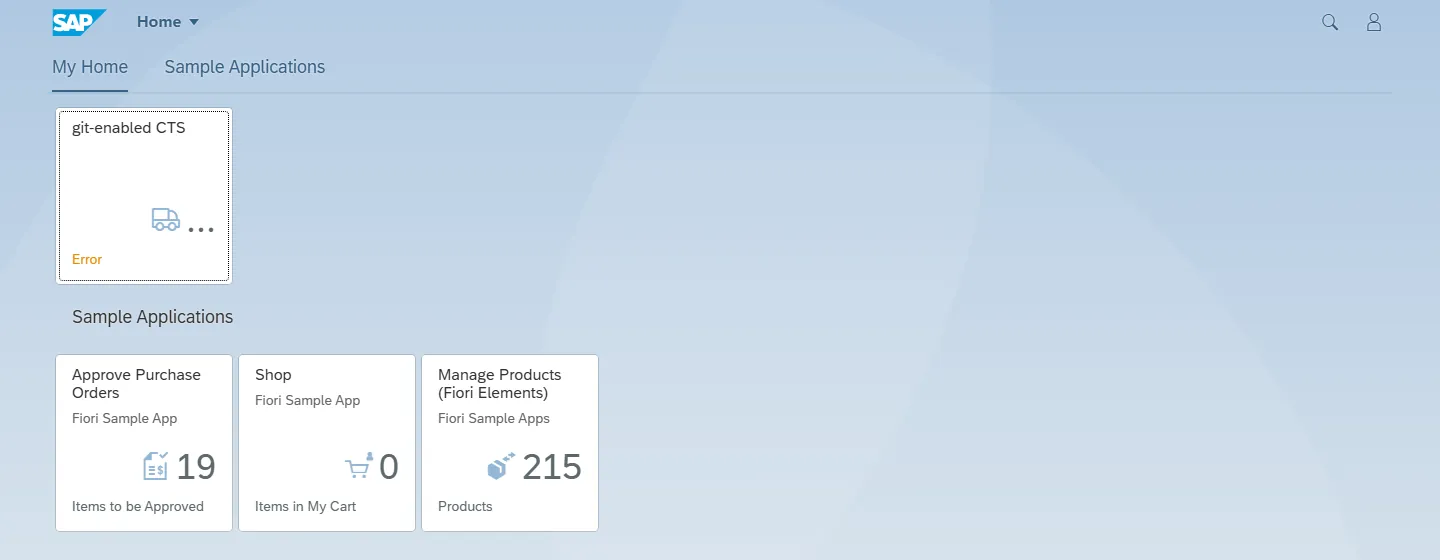
The “Approve Purchase Orders” tile of the SAP Fiori launchpad shows a counter. The test forces it to refresh, proves that the network response matches the figure displayed, then compares it with the number of pending orders counted through RFC on the standard analytical CDS view SEPM_I_PurchaseOrder, before and after the refresh. No rounding, no tolerance: a gap of one unit fails the test and names both numbers.

SAP Fiori launchpadRFCHTTP

Proof: Suite “aggregate of a CDS view compared with the counter shown by a launchpad tile”: 6/6 on September 29, 2026, replayed 6/6 on October 5, 2026: tile at 19, CDS view at 19 before and 19 after, refresh response 28.5 ms after the request.

A4H, release 754Real screenshot
SAP Fiori launchpad of A4H: the Approve Purchase Orders tile shows 19
SAP Fiori launchpad served by A4H (SAPUI5 1.71.47): the “Approve Purchase Orders” tile shows 19, the number the CDS view counts through RFC.A4H, release 754 · Captured on October 5, 2026Screen of SAP software: the SAP logo and SAP trademarks are the property of SAP SE.
Show the suite excerpt
tests/robot/cross/cds_tuile_flp_approbation_a4h.robot
2. Le compteur affiché égale l'agrégat de la vue CDS analytique standard (assertion reine)
    # …
    ${annotations}=    La Vue CDS Devrait Etre Analytique
    ${avant}=    Compter Les Commandes En Attente Par La Vue CDS
    ${tuile}=    Lire Le Compteur Frais De La Tuile D Approbation
    ${apres}=    Compter Les Commandes En Attente Par La Vue CDS
    La Mesure Devrait Etre Stable    ${avant}    ${apres}    ${tuile}
    Le Compteur De La Tuile Devrait Egaler    ${tuile}[number]    ${apres}
    ...    ${INTENT_TUILE_APPROBATION} contre ${VUE_CDS_ANALYTIQUE} au statut ${STATUT_EN_ATTENTE}
resources/page_objects/tuile_cds_approbation.resource
Lire Le Compteur Frais De La Tuile
    # …
    [Arguments]    ${intent}    ${budget}=${BUDGET_COMPTEUR_TUILE}
    ${tuile}=    Refresh Flp Tile Counter    ${intent}    timeout=${budget}
    Should Be Equal    ${tuile}[body_check]    matched
    ...    msg=La réponse du rafraîchissement de ${intent} n'est pas reliée à la valeur lue (${tuile}[body_check]) : rien n'établit que le compteur ${tuile}[value] vient de cette réponse.
    RETURN    ${tuile}
# …
Compter Les Commandes Par La Vue CDS
    # …
    [Arguments]    ${statut}
    ${lignes}=    Read Business Records    ${VUE_SQL_ANALYTIQUE}    ${COLONNE_MANDANT},${COLONNE_COMMANDE}
    ...    filter=${COLONNE_STATUT_GLOBAL} EQ '${statut}'    alias=${WF_RFC_ALIAS}
    ${nombre}=    Les Lignes Devraient Etre Des Commandes Du Mandant Servi    ${lignes}    ${VUE_SQL_ANALYTIQUE}
    RETURN    ${nombre}
SAP GUI + RFC

The role of a Business Partner, added on screen, confirmed in the database

The role is added in transaction BP by its technical key (never by its translated label), then the truth is read through RFC in table BUT100 on the exact key, change document included. The role is then removed through the screen and its disappearance is confirmed on the same key. The screen's change mode is confirmed by whether a field can be edited (Element Should Be Changeable), not by a translated title.

SAP GUI (BP)RFC

Proof: Suite “business role of a Business Partner assigned through the screen, then removed”: 7/7 on A4H on September 28, 2026, writing under explicit consent.

tests/robot/cross/bp_role_partenaire_commercial_a4h.robot
1. Attribuer puis retirer le rôle Prospect par l'écran : la liaison apparaît puis disparaît
    # …
    Ouvrir Le Partenaire    ${CAMPAIGN_PARTNER}
    Passer Le Partenaire En Modification
    Choisir Le Role Par Sa Cle    ${ROLE_PROSPECT}
    La Combo Des Roles Devrait Porter    ${ROLE_PROSPECT}
    ${ajout}=    Sauvegarder Le Partenaire
    Le Message Devrait Etre    ${ajout}    ${MSG_SAVED}
    La Liaison De Role Devrait Etre Ouverte    ${CAMPAIGN_PARTNER}    ${ROLE_PROSPECT}
    ${document_ajout}=    Un Document Devrait Journaliser L Ajout Du Role
    ...    ${CAMPAIGN_PARTNER}    ${ROLE_PROSPECT}    ${depart}
    Retirer Le Role Par L Ecran    ${ROLE_PROSPECT}
    ${retrait}=    Sauvegarder Le Partenaire
    Le Message Devrait Etre    ${retrait}    ${MSG_SAVED}
    Aucune Liaison De Role Ne Devrait Exister    ${CAMPAIGN_PARTNER}    ${ROLE_PROSPECT}
resources/page_objects/bp_business_partner.resource
Lire La Liaison De Role
    # …
    [Arguments]    ${numero}    ${role}
    ${lignes}=    Read Business Records    ${BP_ROLE_LINK_TABLE}    ${BP_ROLE_LINK_FIELDS}
    ...    filter=PARTNER EQ '${numero}' AND RLTYP EQ '${role}'    alias=${BP_RFC_ALIAS}
    RETURN    ${lignes}
SAP GUI + RFC

A job scheduled on screen, awaited and read through RFC

A job with a unique name is defined and saved in SM36 (fields addressed by their label). Its run is found through RFC in the job table, awaited until it ends without any fixed pause, then its spool is read in two independent ways, by the job step and by the spool number. The content displayed by SP01 matches the RFC read.

SAP GUI (SM36, SP01)RFC (XBP)

Proof: Suite “background job scheduled with SM36, awaited, its spool read in two ways”: 11/11 on A4H on October 1, 2026.

tests/robot/cross/job_arriere_plan_spool_a4h.robot
1. Job planifié par SM36, attendu par le journal, son spool lu par RFC (assertion reine)
    # …
    ${nom}=    Nom De Job Unique Du Run    S1
    ${constat}=    Planifier Un Job ABAP Par SM36    ${nom}    ${PROGRAM_WITH_SPOOL}    demarrage=immediat
    Le Message De Sauvegarde Devrait Nommer Le Job    ${constat}[message]    ${nom}
    Les Gestes De Planification Devraient Viser Les Champs Releves    ${constat}    ${nom}
    ...    ${PROGRAM_WITH_SPOOL}    immediat
    ${run}=    Retrouver Le Run Du Job    ${nom}
    ${ok}=    Evaluate    bool($run['jobcount']) and $run['scheduled_by'] == $SAP_USER
    Consigner Le Constat    job.run_by_unique_name    ${ok}
    ...    Get Background Job Run rend le run unique du nom, JOBCOUNT, propriétaire et mandant
    ${attente}=    Attendre La Fin Du Job    ${nom}    ${run}[jobcount]
    ${ok}=    Evaluate    $attente['state'] == 'done'
    Consigner Le Constat    wait.done    ${ok}
    ...    Wait For Background Job jobcount= rend done, statut F relu
    ${pas}=    Le Pas Du Job Devrait Porter Un Spool    ${nom}    ${run}    ${PROGRAM_WITH_SPOOL}
    ${par_pas}=    Read Job Spool    ${nom}    ${run}[jobcount]
    ${par_numero}=    Read Spool Request    ${pas}[spool_id]
resources/page_objects/background_job_spool.resource
Ouvrir La Definition D Un Job
    # …
    [Arguments]    ${nom}
    Go To Transaction    ${SM36_TCODE}
    L Ecran Devrait Etre    ${SM36_PROGRAM}    ${SM36_INITIAL_SCREEN}
    ${id_nom}=    Fill Field By Label    ${SM36_LABEL_JOB_NAME}    ${nom}
RFC + SAP GUI

An outbound IDoc judged by its code, and its inbound counterpart found

The IDoc is created through RFC, sent, then awaited until status 03, judged by its code and never by a text. The inbound IDoc it produces is found by the tRFC TID (never by timestamp) and awaited until status 53. The WE02 monitor, read on screen, must show exactly the statuses the RFC channel read.

RFCSAP GUI (WE02)

Proof: Suite “outbound ALE IDoc created through RFC, sent and judged by code, inbound linked by the TID”: 12/12 on A4H on October 1, 2026, writing under explicit consent.

tests/robot/cross/idoc_sortant_ale_a4h.robot
1. Un IDoc sortant émis atteint le statut 03, jugé par son code, et son entrant n'est pas oublié
    # …
    Dispatch Idoc By Number    ${docnum}
    ${sortant}=    Wait For Idoc Status    ${docnum}    expected=success    timeout=${IDOC_WAIT}
    Should Be Equal    ${sortant}[status]    ${STATUS_OUTBOUND_PASSED_TO_PORT}
    Should Be Equal    ${sortant}[category]    success
    Idoc History Should Be    ${sortant}[history]    ${OUTBOUND_HISTORY}
    Should Not Be Empty    ${sortant}[history][-1][TID]
# …
2. L'entrant lié arrive à 53 et la valeur émise se retrouve dans la table métier
    # …
    ${sortant}=    Dispatch New Flight Customer Change    ${TEST_CUSTOMER}    ${email}
    ${tid}=    Set Variable    ${sortant}[history][-1][TID]
    Should Not Be Empty    ${tid}
    ${lien}=    Get Idoc Counterpart    ${sortant}[docnum]    timeout=${COUNTERPART_WAIT}
    Track Run Idoc    ${lien}[counterpart]
    Should Not Be Equal    ${lien}[counterpart]    ${sortant}[docnum]
    Should Be Equal    ${lien}[counterpart_direction]    ${DIRECTION_INBOUND}
    ${entrant}=    Wait For Idoc Status    ${lien}[counterpart]    expected=${STATUS_INBOUND_POSTED}
    ...    timeout=${IDOC_WAIT}
    Should Be Equal    ${entrant}[status]    ${STATUS_INBOUND_POSTED}
    Should Be Equal    ${entrant}[category]    success
    Idoc History Should Be    ${entrant}[history]    ${INBOUND_HISTORY}
    Should Be Equal    ${entrant}[history][0][TID]    ${tid}
# …
4. WE02 affiche, pour le sortant et pour l'entrant, les statuts que lit le RFC
    # …
    Open Idoc In Monitor    ${sortant}
    ${codes_sortant}=    Read Idoc Status Nodes
    Should Be Equal    ${codes_sortant}[0]    ${chaine}[outbound][status]
    Should Be Equal    ${codes_sortant}[0]    ${STATUS_OUTBOUND_PASSED_TO_PORT}
SAP GUI + RFC

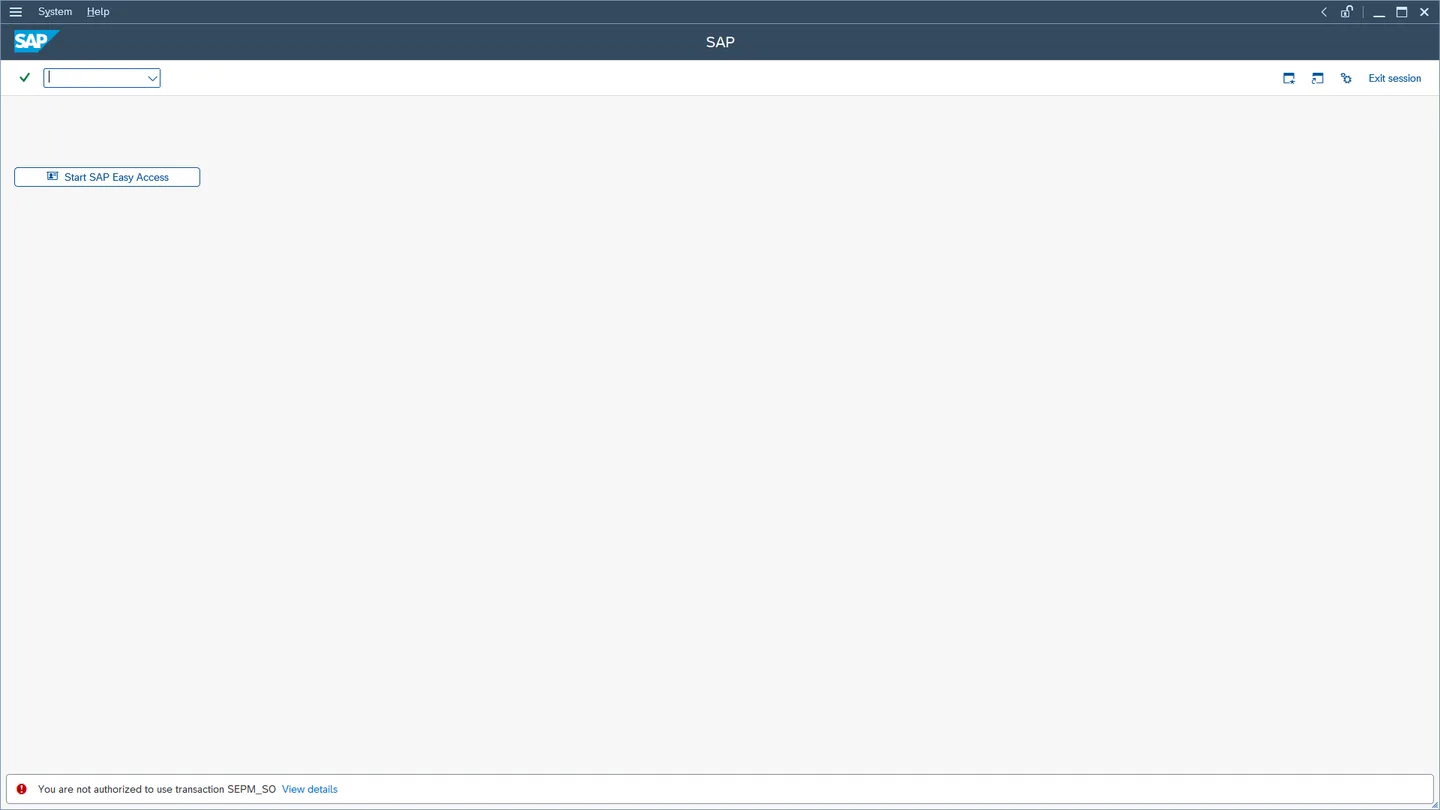
Where the authorization refusal really exists

A test account with the display role, created over RFC (prefix allowlist, mandatory marker, never client 000), tries to open the EPM sales order entry. The launch is refused: the message is judged by its identity (S#/E/077) and never by its text, and the kernel confirms the missing transaction authorization with a check for a named user. Positive witness: SE16 stays authorized and its row count equals the RFC one; counter-proof: T000 is refused. Finding recorded as a warning: on this demo application, a « launch only » role changes an order's note, because no check exists at save. The test will turn red the day a check appears.

SAP GUI (SEPM_SO)RFC (roles, kernel)

Proof: Suite « where the authorization refusal really exists on an EPM sales order »: 11/11 on ABAP Platform 2023 (release 758) on 07/10/2026, 9/9 in conformity mode (findings excluded), writing under explicit consent.

ABAP Platform 2023, release 758Real screenshot
SAP GUI on ABAP Platform 2023: « You are not authorized to use transaction SEPM_SO » in the status bar, for a test user with the display role
The launch of SEPM_SO is refused to the restricted test user: the status bar carries the error, the test judges its identity, not its text.ABAP Platform 2023, release 758 · Captured on October 7, 2026Screen of SAP software: the SAP logo and SAP trademarks are the property of SAP SE.
HTTP + RFC + SAP GUI

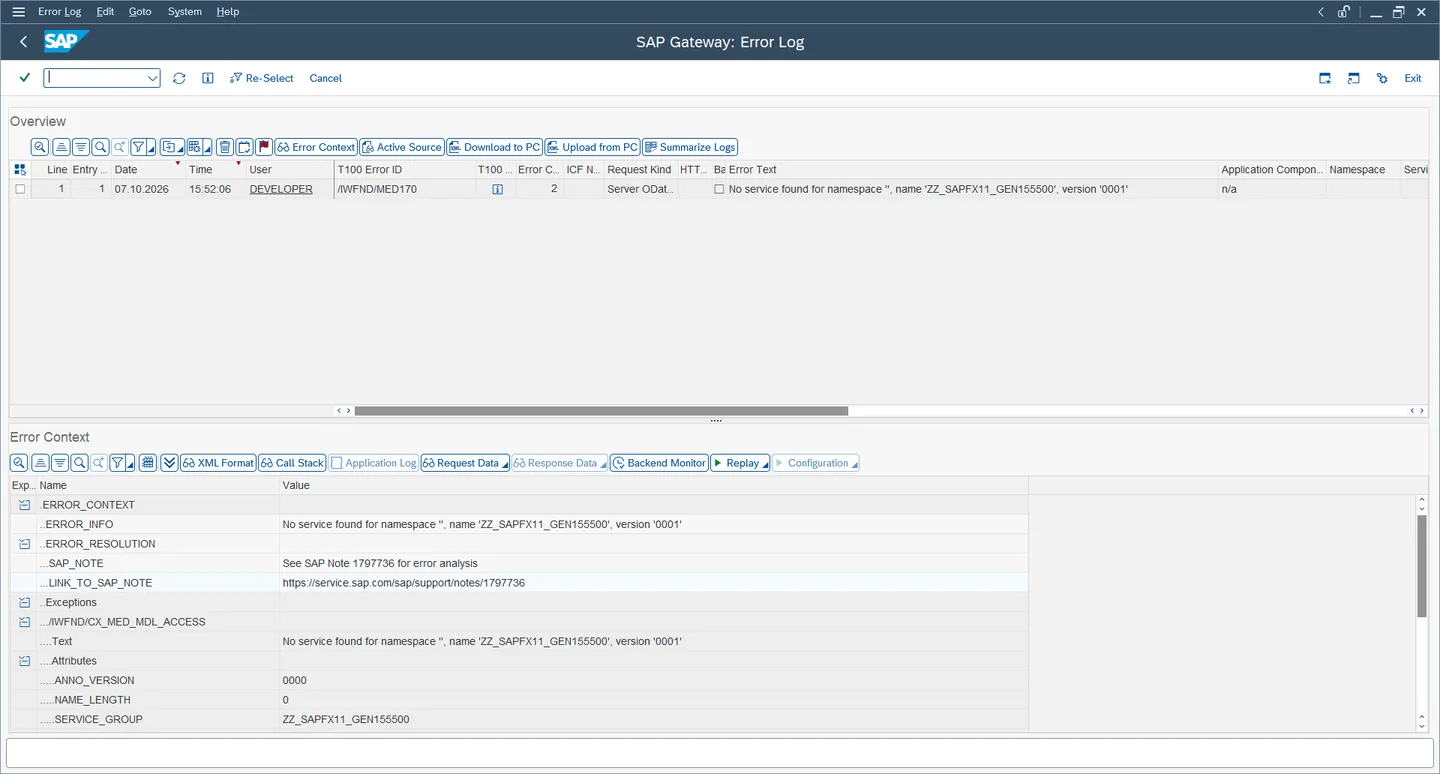
A provoked error, one log entry, found again on screen

An OData call to an invented service, with a name unique per run and proven absent from the registry and the catalogs, is refused with 403 (/IWFND/MED/170). The suite reads the Gateway error log over RFC and proves one new entry, tied to the response received by the transaction identifier and served in the right client, then finds it again on screen. The log groups identical errors: the same call replayed raises the counter of the existing line. Counting entries before and after would therefore prove nothing, hence the proof by URI and transaction.

HTTP (OData)RFCSAP GUI (error log)

Proof: Suite « Gateway FES supervision: a registered, served service, and a named error in the log »: 7/7 on A4H (release 754) on 07/10/2026. The log entries it creates expire after 14 days.

A4H, release 754Real screenshot
Gateway error log on A4H: a single /IWFND/MED170 line with counter 2, with its error context
Gateway error log: the same call replayed stays one line, at counter 2, with its error context.A4H, release 754 · Captured on October 7, 2026Screen of SAP software: the SAP logo and SAP trademarks are the property of SAP SE.
Channel 1 · SapEccLibrary · 195 keywords

SAP GUI for Windows: read, act, prove the target

SapEccLibrary drives SAP GUI for Windows through the SAP GUI Scripting API, on the screens of SAP ECC and SAP S/4HANA® systems. The technical screen identifiers live in a layer of business keywords: the tests speak the language of the business.

ALV grids

Read an ALV grid in full, and prove it

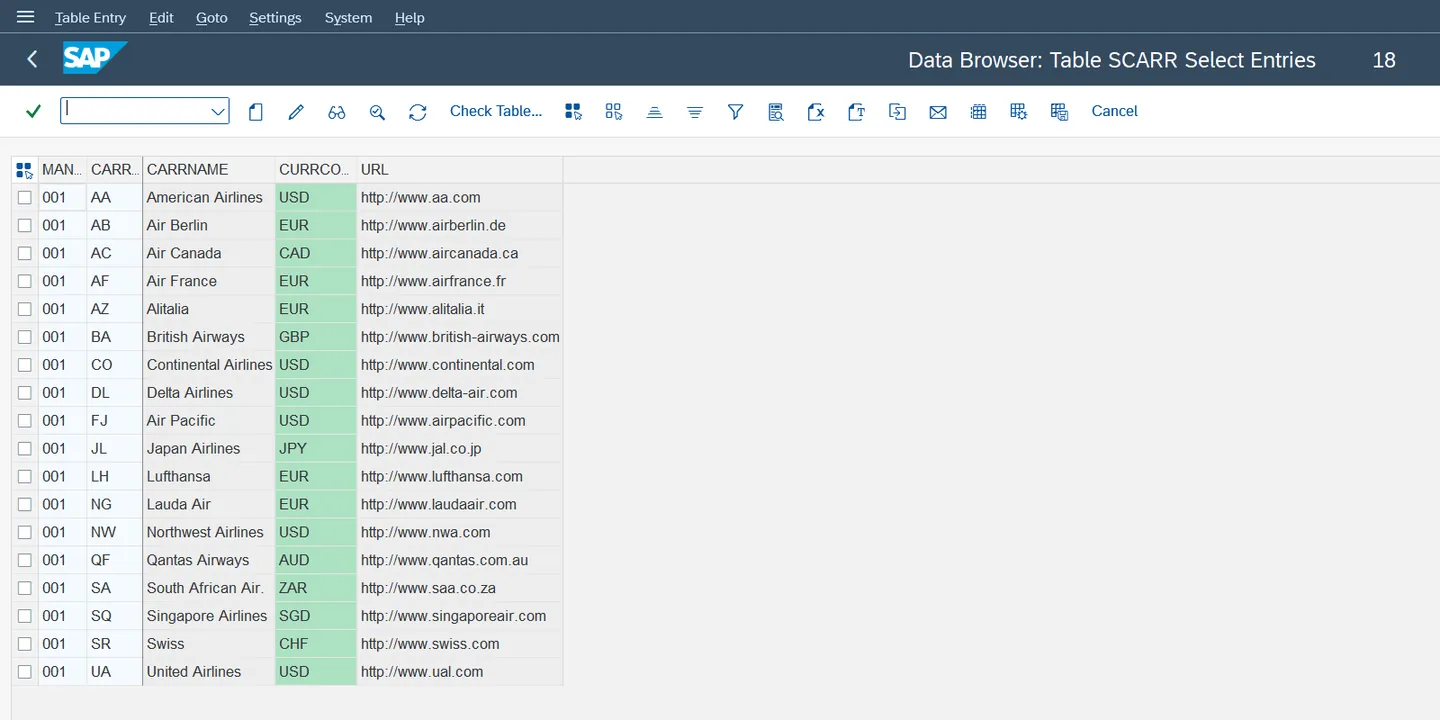
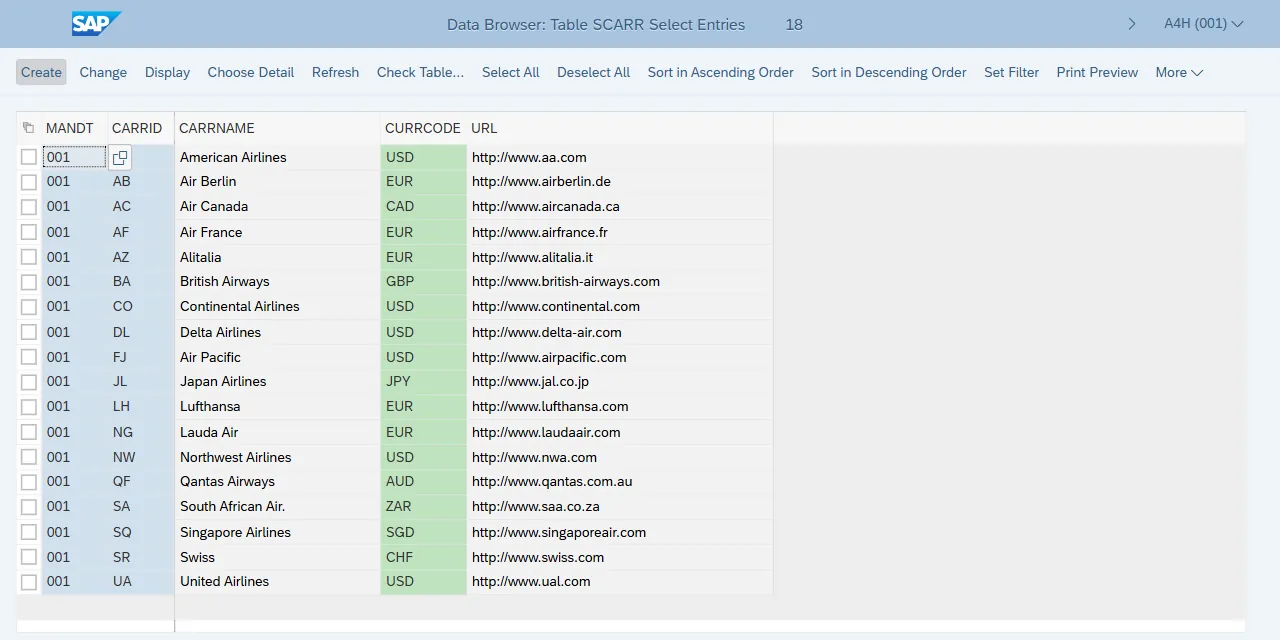
An ALV grid renders its unloaded rows as empty cells instead of raising an error: a hollow read has the right number of rows and passes naive checks. Read Full Grid scrolls the grid to materialize every row, and Count Blank Grid Rows rejects a hollow read. Columns are read by their technical identifier, independent of the language.

Proof: Suite “system smoke test of the T000 clients through SE16”: 1/1 on A4H on September 21, 2026. Screenshot of the same read on SCARR on October 5, 2026.

A4H, release 754Real screenshot
SAP GUI: ALV grid of table SCARR in the SE16 Data Browser, 18 rows
SE16 ALV grid on table SCARR, read in full by SapEccLibrary: 18 rows, no empty row.A4H, release 754 · Captured on October 5, 2026Screen of SAP software: the SAP logo and SAP trademarks are the property of SAP SE.
tests/robot/ui/ecc/smoke_test_t000_se16.robot
La table des mandants répond avec au moins les mandants standard
    # …
    Display Table Contents    T000
    ${rows}=    Read Full Displayed Grid
    ${row_count}=    Get Length    ${rows}
    Should Be True    ${row_count} >= ${MIN_EXPECTED_CLIENTS}
    ...    msg=T000 should list at least ${MIN_EXPECTED_CLIENTS} clients (000 and 001), got ${row_count}
    ${blank_rows}=    Count Blank Grid Rows    ${rows}
    Should Be Equal As Integers    ${blank_rows}    0
    ...    msg=T000 read is incomplete: ${blank_rows} fully blank row(s) in a grid announcing ${row_count} row(s)
    FOR    ${row}    IN    @{rows}
        Should Not Be Empty    ${row}[MANDT]
        ...    msg=A T000 row is missing its MANDT value: ${row}
    END
Perception

See the screen like an AI agent: annotated screenshot and numbered map

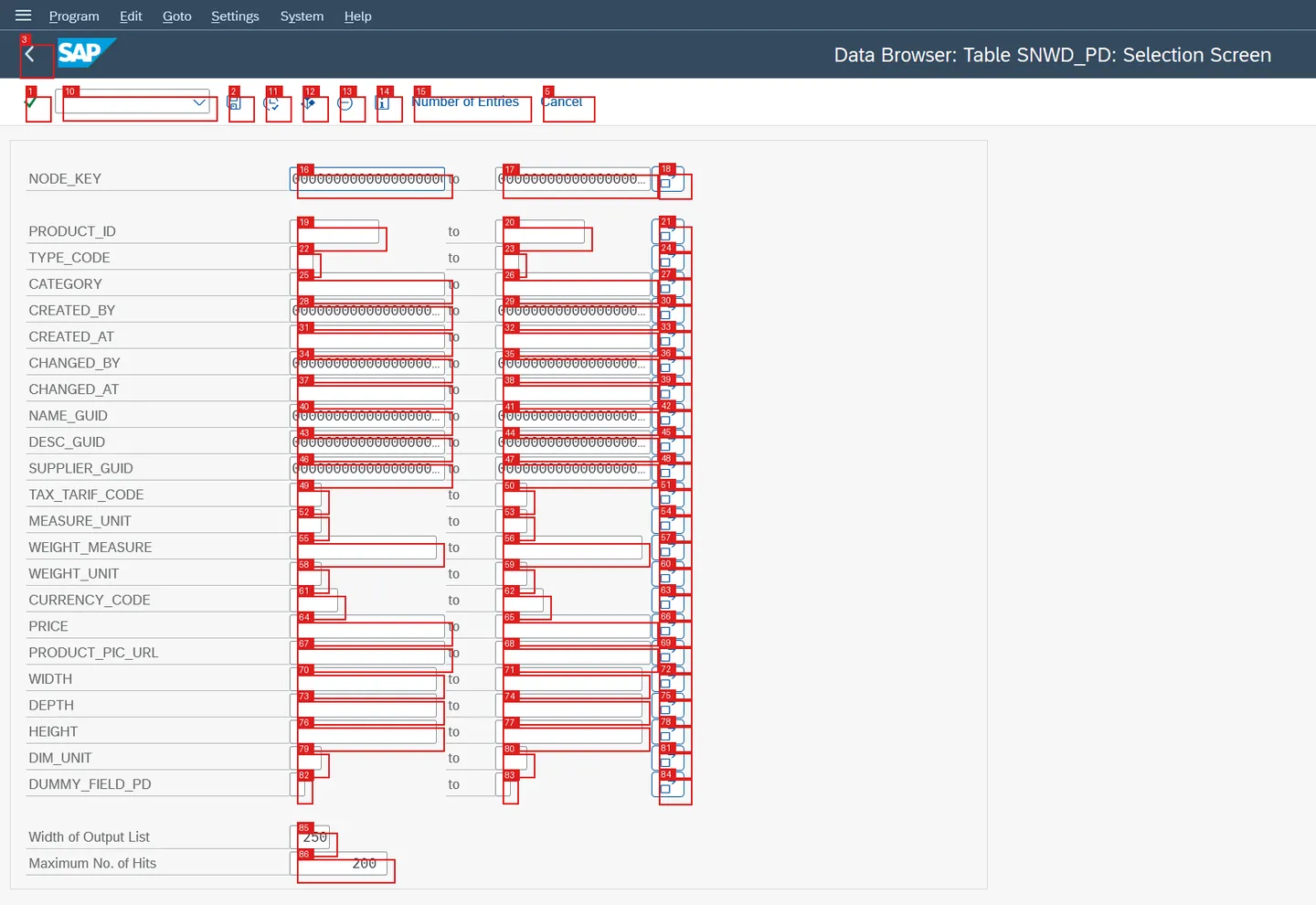
For an AI agent as for a human debugging, SapEccLibrary makes the screen readable: Get Annotated Screenshot numbers every actionable target on the image, Get Screen Map lists them with the human label, the identifier and the value. The agent reads a number, the library acts on a verified identifier. These references are meant for interactive driving, never for a delivered suite.

Proof: Capture suite for this page: 4/4 on A4H on October 5, 2026.

A4H, release 754Real screenshot
SAP GUI: SE16 selection screen of SNWD_PD, each field boxed and numbered
Annotated screenshot of the SE16 selection screen of table SNWD_PD: 86 numbered targets, taken by Get Annotated Screenshot.A4H, release 754 · Captured on October 5, 2026Screen of SAP software: the SAP logo and SAP trademarks are the property of SAP SE.
comms/captures-site/capture_site_gui.robot
Ecran De Selection SE16 Annote
    # …
    ${shot}=    Get Annotated Screenshot
    Ecrire Image    ${shot}[image]    gui-se16-annotated
    ${carte}=    Get Screen Map
    Create File    ${OUTPUT DIR}/gui-se16-annotated-legend.txt    ${carte}
SAP GUI controls

Table controls, trees, drop-down lists: by title, by text, by key

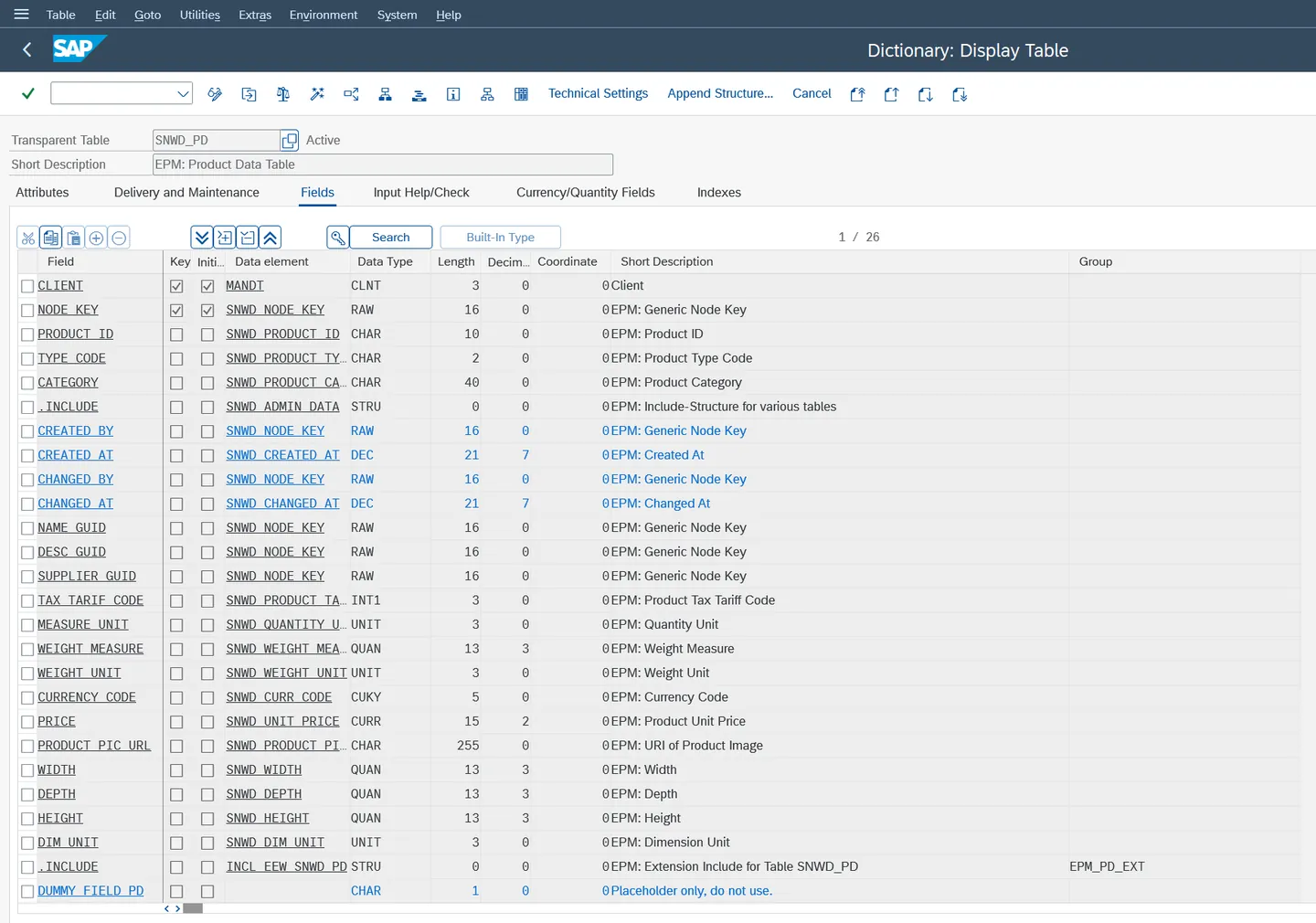
A dynpro table control is read by column title (Read Table Control), its checkboxes rendered as ABAP flags; an SAP tree is read node by node (Read Tree Nodes) and selected by its text; a drop-down list is driven by its technical key (Select Combo Box Entry By Key), so independently of the language.

Proof: SE11 campaign cross-checked with the dictionary: 7/7 on September 5, 2026. SAP GUI capability register: 21/21 on release 754 on September 7, 2026, 10/10 on release 758 on September 8, 2026.

A4H, release 754Real screenshot
SAP GUI: Fields tab of transaction SE11 on table SNWD_PD, table control with 26 fields
SE11 table control, “Fields” tab of table SNWD_PD: 26 fields read by column title.A4H, release 754 · Captured on October 5, 2026Screen of SAP software: the SAP logo and SAP trademarks are the property of SAP SE.
resources/page_objects/se11_dictionary_display.resource
Read Se11 Table Fields
    # …
    Click Element    ${SE11_TAB_FIELDS}
    Wait Until Busy Done
    ${rows}=    Read Table Control    ${SE11_TABLE_FIELDS_TC}
    RETURN    ${rows}
resources/page_objects/sapgui_capability_probes.resource
Lire Les Noeuds Du Menu Utilisateur
    # …
    ${noeuds}=    Read Tree Nodes    ${SM_USER_MENU_TREE}
    RETURN    ${noeuds}
# …
Selectionner Le Dossier Plain ABAP Par Texte
    # …
    ${cle}=    Select Tree Node By Text    ${SM_USER_MENU_TREE}    ${SM_TREE_PLAIN_ABAP_TEXT}    exact=True
    RETURN    ${cle}
# …
Choisir L Evenement Par Cle
    # …
    Select Combo Box Entry By Key    ${SM37_EVENT_COMBO}    ${cle}
Target proof

Prove which system you are talking to, before any write

Two systems can announce the same identifier and the same host name: this is the case of the two lab containers. Get System Identity reads “System: Status”, the kernel and the installed components, and System Identity Should Be rejects the target if the release, the kernel or the client are not the expected ones. Read on October 5, 2026: A4H, client 001, release 754, kernel 777.

Proof: Target guard of the write campaigns (Business Partner, jobs, IDoc), seen refusing when pointed at the other lab container.

resources/page_objects/bp_business_partner.resource
La Cible SAP GUI Devrait Etre
    # …
    [Arguments]    ${release}    ${kernel}    ${client}
    ${identite}=    Get System Identity
    System Identity Should Be    identity=${identite}    basis_release=${release}
    ...    kernel_release=${kernel}    client=${client}
    RETURN    ${identite}
Channel 2 · SapFioriLibrary · 98 keywords

SAP Fiori, SAPUI5 and SAP GUI for HTML: controls, not DOM identifiers

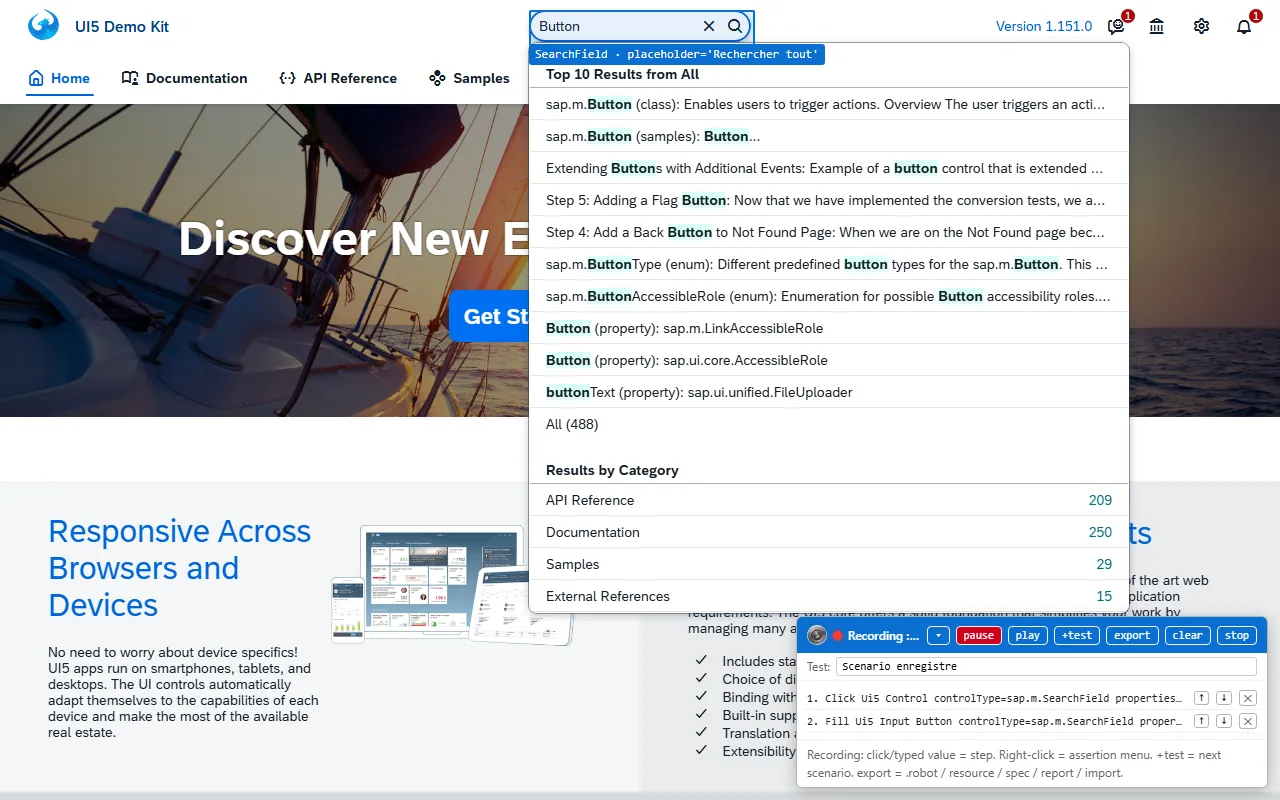
SapFioriLibrary builds on the Browser library (Playwright). It addresses UI5 controls by their type, their properties or their binding path, never by generated DOM identifiers, and waits until the page is truly idle (Wait For Ui5 Idle) instead of a fixed pause. Five resolution engines also cover the WebGUI, UI5 Web Components and the non-SAP areas of a hybrid page.

Launchpad

The SAP Fiori launchpad: open by intent, read the tiles

An app opens by its semantic intent (Open Fiori App), the stable route that survives theme, language and catalog reorganizations. The counter of a dynamic tile is awaited until it is really loaded (Wait For Flp Tile Counter), then read as a number: the tile declares itself loaded while it still shows a placeholder value.

Proof: Campaigns on the launchpad served by an ABAP server: 20/20 on SAPUI5 1.71 and 22/22 on SAPUI5 1.120, on August 25, 2026. Screenshot of the tile: see the hybrid test above.

resources/page_objects/abap_flp.resource
Ouvrir L Application Par Intent
    # …
    [Arguments]    ${intent}
    Open Fiori App    ${intent}
    Attendre Le Fragment    ${intent}
    Wait For Ui5 Idle    settle=${ABAP_FLP_SETTLE}    timeout=${ABAP_FLP_IDLE_TIMEOUT}
    Wait Until Keyword Succeeds    60s    2s    L Application Ouverte Est    ${intent}
resources/page_objects/tuile_cds_approbation.resource
Lire Le Compteur Charge De La Tuile
    # …
    [Arguments]    ${intent}    ${budget}=${BUDGET_COMPTEUR_TUILE}
    ${tuile}=    Wait For Flp Tile Counter    ${intent}    timeout=${budget}
    RETURN    ${tuile}
RAP

The Fiori Elements preview of a RAP service, with no deployed app

The ABAP server generates on the fly the Fiori Elements interface of any published RAP service. Build Fe Preview Path builds its address, one parameter of which is obfuscated, and the browser authenticates through an HTTP header. Dates are entered in the format computed by the binding type (Fill Ui5 Date), then read back from the model.

Proof: Suite “RAP trip created through Fiori Elements, draft then active, refusal and discard”: 7/7 on release 758 on September 24, 2026.

ABAP Platform 2023, release 758Real screenshot
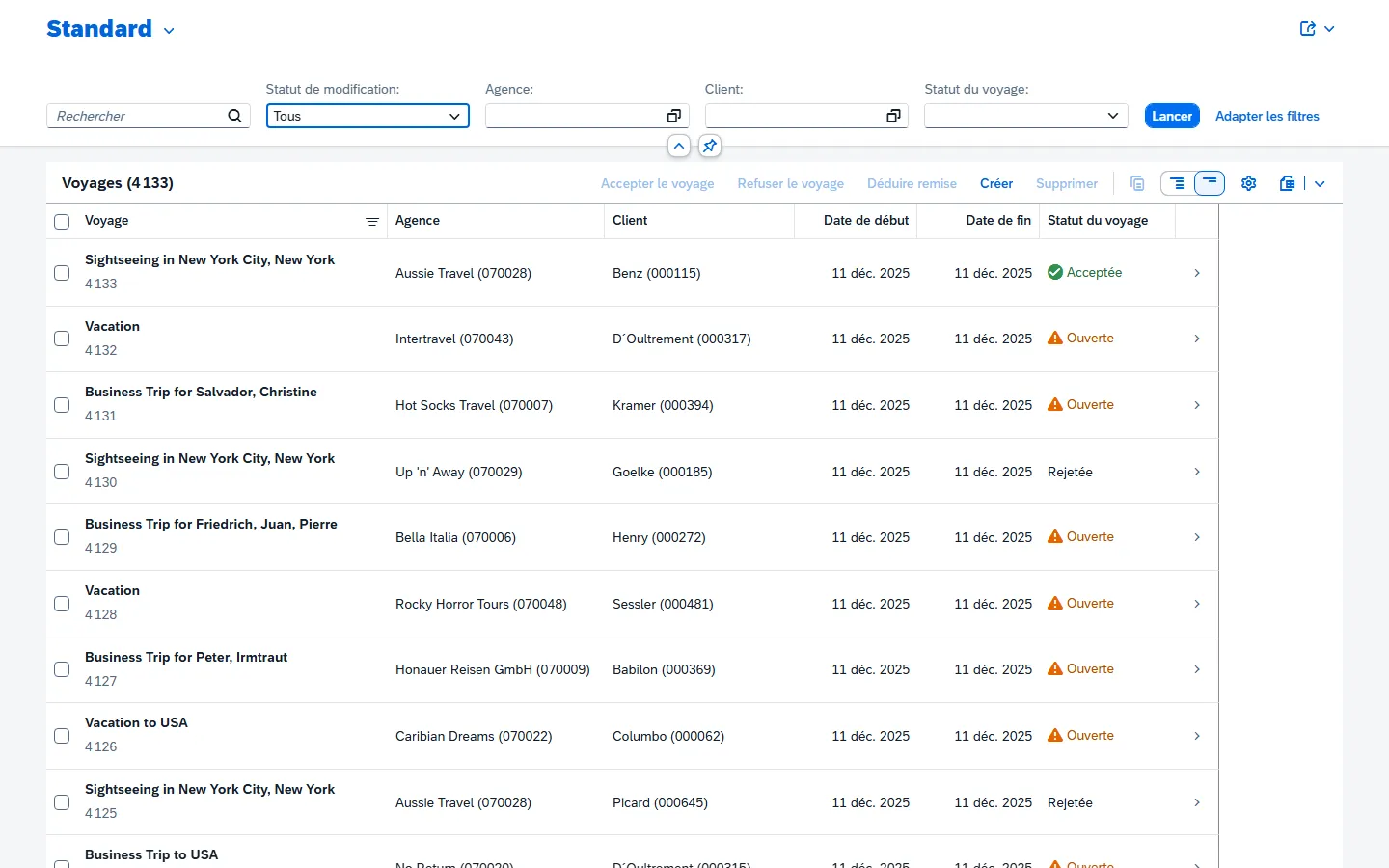
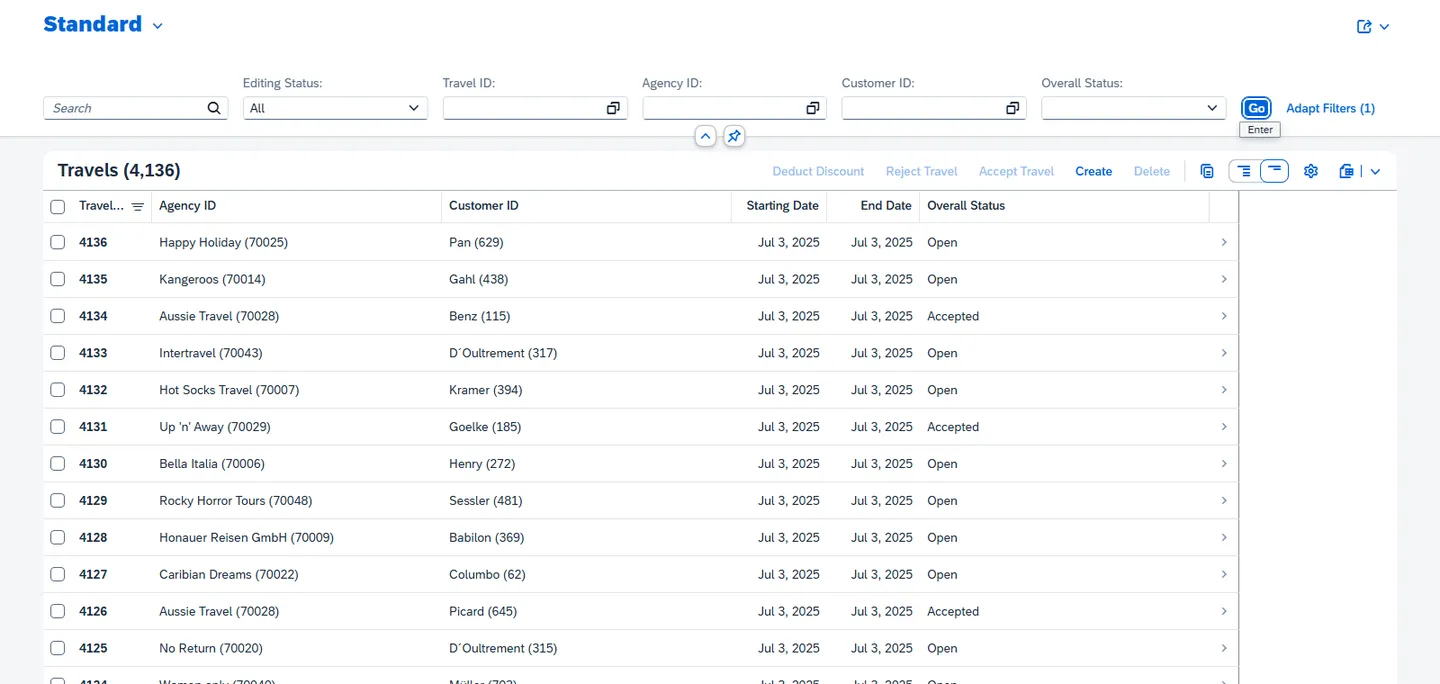
SAP Fiori Elements preview of the RAP travel service on ABAP Platform 2023, 4,136 trips
Fiori Elements preview of the RAP service of the reference travel scenario: 4,136 trips listed.ABAP Platform 2023, release 758 · Captured on October 5, 2026Screen of an SAPUI5 application: the SAP logo and SAP trademarks are the property of SAP SE.
resources/page_objects/rap_travel_fe_preview.resource
Ouvrir Le Navigateur Des Voyages
    # …
    New Browser    ${BROWSER}    headless=${RAP_TRAVEL_HEADLESS}
    New Context    ignoreHTTPSErrors=${True}    locale=${RAP_TRAVEL_LOCALE}
    ...    viewport=${RAP_TRAVEL_VIEWPORT}
    ...    httpCredentials={'username': '$RAP_TRAVEL_USER', 'password': '$RAP_TRAVEL_UI_PASSWORD'}
    Set Browser Timeout    ${RAP_TRAVEL_TIMEOUT}
    New Page    about:blank
    ${chemin}=    Build Fe Preview Path    ${RAP_TRAVEL_BINDING}    ${RAP_TRAVEL_SERVICE}
    ...    ${RAP_TRAVEL_ROOT_SET}    client=${RAP_TRAVEL_CLIENT}
    Set Suite Variable    ${RAP_TRAVEL_PREVIEW_URL}    ${RAP_TRAVEL_UI_URL}${chemin}
SAP GUI for HTML

The WebGUI: the grid read through the identifiers of its cells

A WebGUI grid sends only one page of rows, renumbered from 1: a truncated read is clean and indistinguishable from a complete one. Read Webgui Grid reads each cell by its SID (the same identifier space as desktop scripting) and the total the grid publishes; the same completeness guard as on the other channels rejects a truncated read.

Proof: Suite “extraction of a WebGUI grid to five file formats”: 8/8 on A4H on September 15, 2026.

A4H, release 754Real screenshot
SAP GUI for HTML: SE16 Data Browser on table SCARR, 18 rows
SE16 in SAP GUI for HTML on table SCARR: 18 rows read for 18 declared.A4H, release 754 · Captured on October 5, 2026Screen of SAP software: the SAP logo and SAP trademarks are the property of SAP SE.
resources/fiori_keywords.resource
Extract Displayed WebGui Grid
    # …
    [Arguments]    ${sid}=${EMPTY}    ${key}=${EMPTY}    ${source}=${EMPTY}
    ${grille}=    Read Webgui Grid    ${sid}
    ${nom}=    Set Variable If    '${source}' == '${EMPTY}'
    ...    grille WebGUI ${grille}[container]    ${source}
    ${extrait}=    Build Table Extract    ${grille}[rows]    columns=${grille}[columns]
    ...    headers=${grille}[headers]    declared_rows=${grille}[declared_rows]
    ...    source=${nom}    key=${key}
tests/robot/ui/fiori/extraction_grille_webgui.robot
    ${partiel}=    Extract Displayed WebGui Grid    key=${KEY_COLUMN}
    ...    source=${EXTRACTED_TABLE} plafonnée à ${OVERFLOW_HITS}
    Should Be True    ${partiel}[declared_rows] > ${partiel}[row_count]
    ...    msg=Le cas dangereux n'a PAS été provoqué : la grille a rendu ses ${partiel}[row_count] lignes en entier, donc cette contre-épreuve ne prouve rien. Monter ${OVERFLOW_HITS}.
    Should Be Equal As Integers    ${partiel}[blank_rows]    ${0}
    ...    msg=Ces lignes devraient être PROPRES : c'est ce qui rend le cas indétectable autrement que par le total déclaré.
    Should Be Equal    ${partiel}[complete]    ${False}
    ${erreur}=    Run Keyword And Expect Error    RELEVÉ REFUSÉ*
    ...    Table Extract Should Be Complete    ${partiel}
SAP BTP · SAP Build Work Zone

SAP BTP: a cloud launchpad behind its identity provider

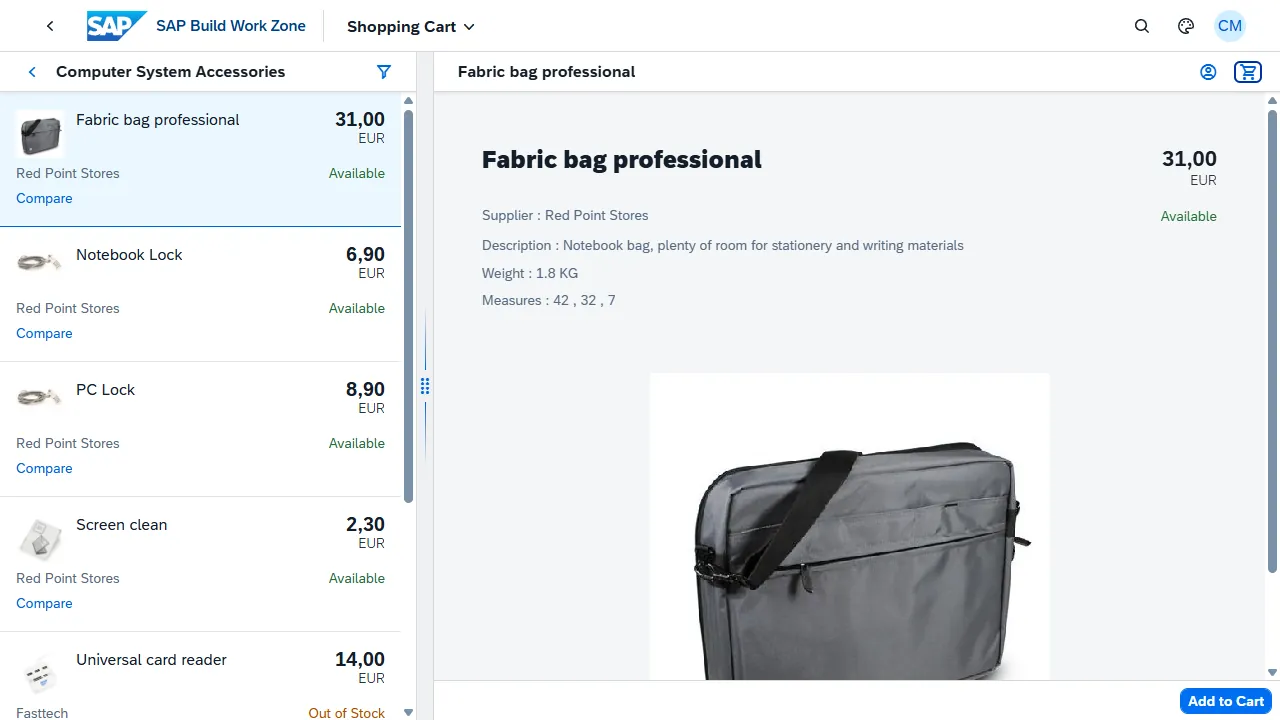
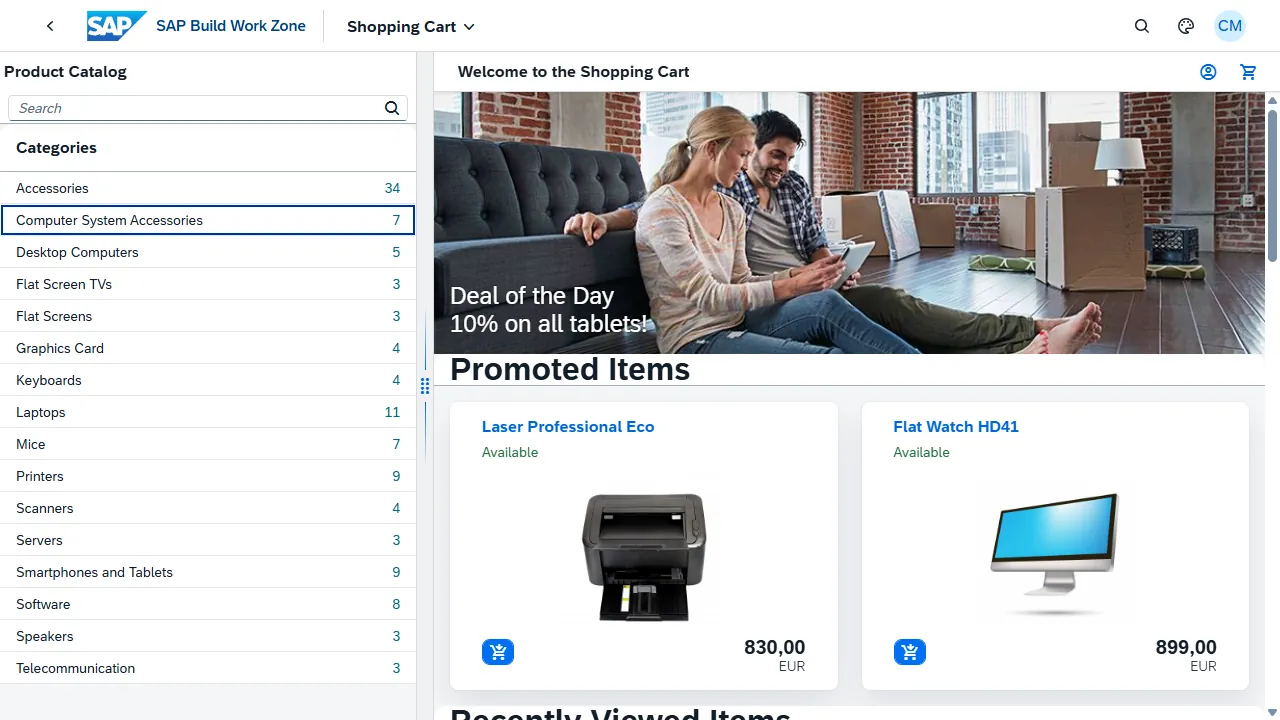
An SAP Build Work Zone site on SAP BTP, protected by an SAP Cloud Identity Services tenant. SapFioriLibrary signs in through the identity provider, perceives a shell whose bar is built with UI5 Web Components and enters the app opened in its iframe; SapApiLibrary opens the API channel of the same site with OAuth2.

Frame scope

The shell and the app, two sealed-off worlds

From the shell, the app's controls are invisible, and vice versa. The test proves it with a witness: the shell's search field, resolved once from the shell and zero times from the app. Without this isolation, a test would click in the wrong place and still stay green.

Proof: Same campaign, frame scope scenario: 9/9 on August 24, 2026.

tests/robot/ui/fiori/exploration_launchpad_workzone.robot
La portee de frame est etanche entre le shell et l application
    # …
    ${apps}=    Inventorier Les Applications Du Catalogue
    Ouvrir L Application Par Intent    ${apps}[0][intent]
    Entrer Dans L Application
    ${dans_l_app}=    Compter Le Champ De Recherche Du Shell
    ${composition_app}=    Lire La Composition De La Portee Courante
    Sortir De L Application
    ${sur_le_shell}=    Compter Le Champ De Recherche Du Shell
    ${composition_shell}=    Lire La Composition De La Portee Courante
    Should Be Equal As Integers    ${dans_l_app}    0
    ...    msg=Le champ de recherche du shell est résolu depuis l'application : la portée fuit.
    Should Be Equal As Integers    ${sur_le_shell}    1
    ...    msg=Le champ de recherche du shell n'est plus résolu après le retour au shell.
API channel

The site's API channel, with OAuth2 through a service key

A service key of the subaccount opens the API channel with OAuth2 (client credentials) using Open Api Session. The reconnaissance classifies each refusal by its structure (Classify Http Response: route unknown to the platform router, route missing from an app, authorization refused, login page served with a 200). It established, instead of assuming it, that a service key opens the backend of a service, not the administration interface of the site.

Proof: Campaign “reconnaissance of the API channel of a BTP target”: 9/9 on August 26, 2026.

Screenshots and campaigns from August 2026: on October 5, 2026, the lab's SAP BTP trial account no longer responded (“The URL does not reference a valid account”), so they were not replayed for this page.

Channel 3 · SapApiLibrary · 149 keywords

OData v2/v4 and RFC/BAPI: testing without a screen

SapApiLibrary speaks HTTP with the Python standard library (SAP's CSRF protocol included) and RFC through pyrfc, which is optional. It is the channel that prepares data, checks a result without going through the screen and reads the configuration of an ABAP system.

OData

The contract of an OData service, its labels, its batches

The $metadata of a service is read with its human labels (Get Odata Metadata, Find Odata Property By Label): the contract is checked at the source. Several reads go out in a single $batch round trip (Post Odata Batch), each operation judged separately. The same keywords work for an OData v2 Gateway, a CAP service in OData v4 and the SAP Business Accelerator Hub sandbox.

Proof: API channel suite: 8/8 on the A4H Gateway and 4/4 in OData v4 on August 19, 2026, 5/5 on the SAP Business Accelerator Hub sandbox on August 23, 2026.

resources/api_keywords.resource
Business Service Should Expose Entity Set
    # …
    [Arguments]    ${service}    ${entity_set}    ${alias}=${API_ALIAS}
    ${meta}=    Get Odata Metadata    ${service}    alias=${alias}
    Dictionary Should Contain Key    ${meta}[entity_sets]    ${entity_set}
    ...    msg=Le service ${service} ne publie pas l'ensemble d'entités ${entity_set}.
    RETURN    ${meta}[entity_sets][${entity_set}]
tests/robot/api/canal_api_odata.robot
Plusieurs Lectures Tiennent En Un Seul Aller Retour
    # …
    ${reponses}=    Read Business Entities In One Roundtrip    ${EPM_SHOP_SERVICE}
    ...    Products?$top=2    Products/$count    alias=a4h
    Length Should Be    ${reponses}    2
    FOR    ${reponse}    IN    @{reponses}
        Should Be True    ${reponse}[status] < 300    msg=Opération du lot en erreur : ${reponse}
    END
Reversible write

Create, update, read back, delete: disappearance proven on the entity

The test data factory creates an entity, updates it, reads it back, then removes it. Cleanup is proven on the entity itself and not on a count back to its starting value: on a service with drafts, a draft is not included in the $count, so an unchanged count proves nothing.

Proof: Same suite, OData v4 lane: 4/4 on August 19, 2026.

tests/robot/api/canal_api_odata.robot
Les Donnees De Test Creees Sont Retirees A La Fin
    # …
    ${entite}=    Create Test Entity    ${TRAVEL_ENTITIES}    ${{ {'Description': 'Recette du canal API'} }}
    ...    alias=cap    track=${False}
    ${chemin}=    Build Draft Entity Path    ${TRAVEL_ENTITIES}    ${TRAVEL_KEY_FIELD}
    ...    ${entite}[${TRAVEL_KEY_FIELD}]
    Track Created Entity    ${chemin}    alias=cap
    Patch Odata    ${chemin}    ${{ {'Description': 'Recette du canal API, modifiee'} }}    alias=cap
    ${relue}=    Get Odata    ${chemin}    alias=cap
    Should Be Equal    ${relue}[Description]    Recette du canal API, modifiee
    ...    msg=La modification n'est pas relue : l'écriture n'est pas confirmée.
    Remove Created Test Data    alias=cap
    ${apres}=    Run Keyword And Ignore Error    Get Odata    ${chemin}    alias=cap
    Should Be Equal    ${apres}[0]    FAIL
    ...    msg=L'entité de test répond encore après le nettoyage : donnée laissée derrière.
RFC and BAPI

Tables, BAPIs judged by type, refusals named by code

Read Rfc Table reads a projected, filtered and bounded table. Call Bapi judges a BAPI on the type of its messages (E, A or X make it fail), never on their translated text, and an expected refusal is asserted by its technical code (Rfc Should Fail With Code). Background jobs are awaited by bounded polling of the job table (Wait For Background Job).

Proof: RFC and BAPI channel suite: 16/16 on release 754 on August 27, 2026, 10/10 on release 758 on August 28, 2026.

resources/rfc_keywords.resource
Read User Details
    # …
    [Arguments]    ${user}    ${alias}=${RFC_ALIAS}
    ${detail}=    Call Bapi    ${BAPI_USER_DETAIL}    alias=${alias}    USERNAME=${user}
    RETURN    ${detail}
tests/robot/api/canal_rfc_a4h.robot
Les Refus Se Classent Par Code Jamais Par Texte
    # …
    Reading A Missing Table Should Be Refused With Code    ${CODE_TABLE_ABSENTE}
    Reading A Missing Field Should Be Refused With Code    ${CODE_TABLE_SANS_DONNEES}
    Calling A Missing Function Module Should Be Refused With Code    ${CODE_MODULE_ABSENT}
    Calling With An Unknown Parameter Should Be Refused With Code    ${CODE_PARAMETRE_INVALIDE}
resources/rfc_keywords.resource
Read Business Records
    # …
    [Arguments]    ${table}    ${fields}    ${filter}=${EMPTY}    ${limit}=0
    ...    ${alias}=${RFC_ALIAS}
    ${lignes}=    Read Rfc Table    ${table}    ${fields}    alias=${alias}
    ...    options=${filter}    rowcount=${limit}
    RETURN    ${lignes}
ABAP security

The security configuration of an ABAP system, read through RFC

Profile parameters are judged on their return code before their value (Read Profile Parameters), because an unknown parameter returns an empty string indistinguishable from an empty parameter. Profile Parameters Should Be Defined guards the start of a campaign, and Security Posture Should Not Have Drifted compares the posture with a committed reference. The attack surface can be read too: accounts that can really be used, web services actually served, audit log coverage. Read-only from end to end.

Proof: Security configuration campaigns: 15/15 on release 754 and 16/16 on release 758 on August 29, 2026; attack surface: 12/12 on release 758 on September 14, 2026.

Around the libraries

Recorders, AI agents and keyword documentation

The libraries stand on their own. Around them, the SAPFX workbench adds what you need to write tests faster and to maintain them. Its ten tools, optional and on quote, are presented one by one on the workbench tools page.

AI agents and MCP

Agents that explore, write and repair, under control

Five agents (plan, generate, repair, verify, document according to ISTQB) drive SAP through the rf-mcp MCP server and the SAPFX plugins, in Claude Code or GitHub Copilot. They apply the Spec-Test-Driven Development method: the specification is confronted with the real system, each step of a test is executed before it is written, and repair never touches the assertions. The agents and the MCP overlay are part of the SAPFX workbench, not of the PyPI package, which carries the libraries.

Proof: The film “How AI agents drive SAP” (8 min 20) shows them at work.

Documentation

The reference for every keyword, with its arguments

Every keyword of the three libraries is documented, with its arguments and examples, in reference pages in English: SapEccLibrary, SapFioriLibrary and SapApiLibrary, version 0.8.5.

Proof: Also published on GitHub Pages, with the public repository of the libraries.

How this page is made

Real screenshots, real code, limits stated

Real screenshots

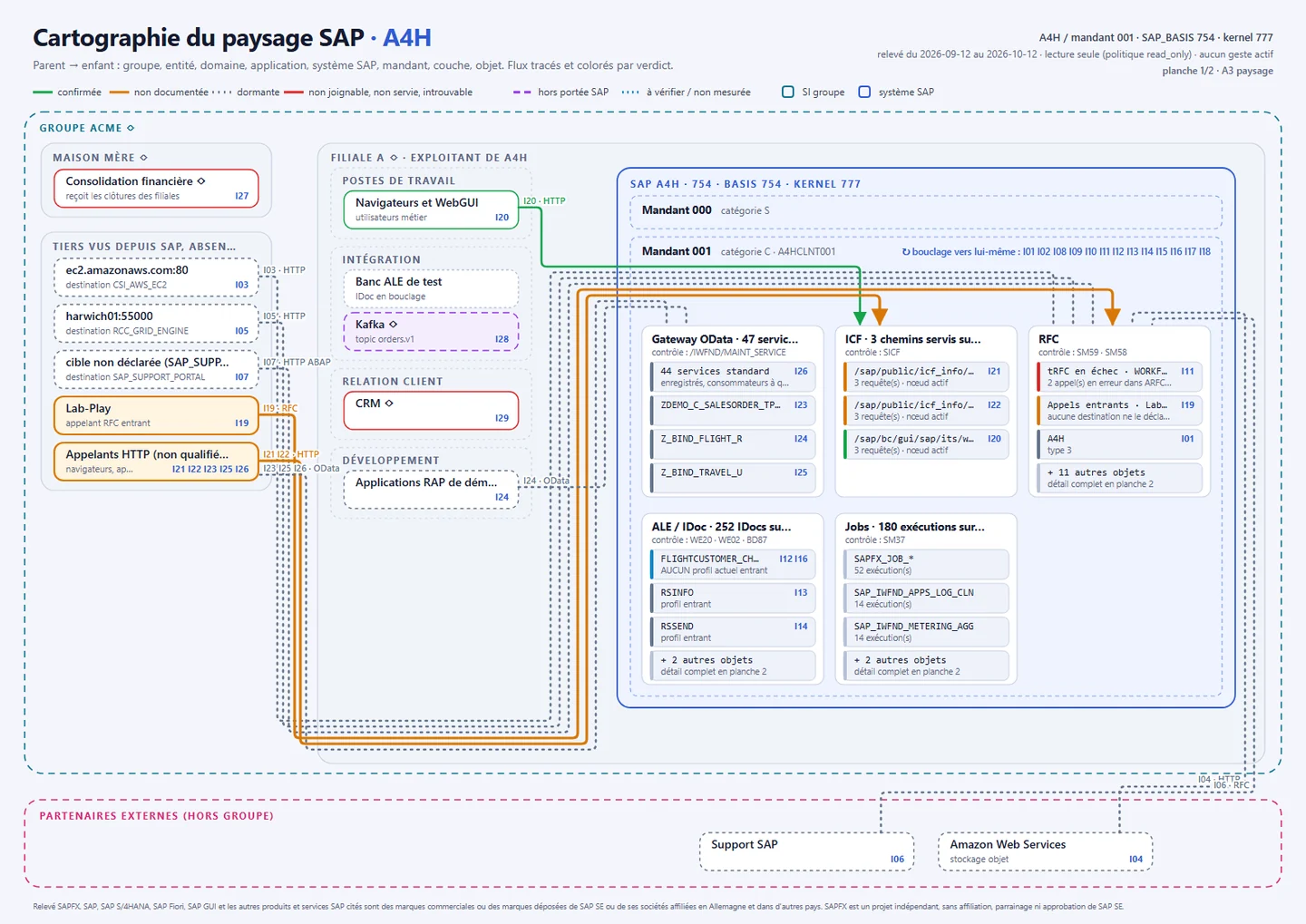
The SAP screens were captured by SAPFX itself (screenshot keywords of the libraries, then the Browser library) on the lab systems, on October 5, 2026, and on August 29, 2026 for SAP BTP, with no retouching other than cropping (and the SAP logo, masked on the landscape map proofs); each caption carries its date. They show demo data delivered by SAP, no customer data. The SAP logo and SAP trademarks visible on these screens are the property of SAP SE.

Real code

Each excerpt is copied, line for line, from a suite validated live whose name, result and date appear under the excerpt; “# …” marks a cut. An automated check, run before every publication, rejects a keyword that does not exist in version 0.8.5 and a line missing from its source suite.

Limits stated

These tests run on SAP development systems in containers, never on a customer system, and measure no productivity gain. The names of the business keywords (in French in these suites) belong to the lab's resources layer: they are examples to adapt to each installation, not a universal vocabulary.

Your case

An SAP process to automate, across two or three channels?

Describe the flow to us: we will tell you what SAPFX covers today and what would need to be built. Services on quote.

  • A technical exchange, not a sales pitch
  • Your data stays in France
Quickstart guide

or straight by email: