Optional · On quote · Around the v0.8.5 libraries

The SAPFX workbench tools: write, delegate and maintain your SAP tests

The SAPFX workbench tools are optional tools, delivered on quote, that speed up writing and maintaining automated SAP tests with Robot Framework: a SAP GUI recorder, a recorder for SAP Fiori and the WebGUI, a tool that scores test requests before they go to the agents, five AI agents and their framework, an MCP bridge for AI assistants, preventive maintenance, a map of the interfaces of your SAP system, an example business layer and an installation pack for Windows. They come on top of the SAPFX libraries (package robotframework-sapfx, Apache 2.0, free on PyPI), which drive SAP GUI, SAP Fiori, OData and RFC and are enough to write and run your tests. The tools replace nothing: they produce ordinary Robot Framework tests that call the same keywords.

produce ordinary .robot and .resource files
SAPFX librariesIncluded · free
SapEccLibrarySAP GUI · 195
SapFioriLibraryFiori, WebGUI · 98
SapApiLibraryOData, RFC · 149
442 keywords · pip install robotframework-sapfx · Apache 2.0
10
tools around the libraries
5
AI agents specialised in SAP
5
export formats per recorder
3
MCP plugins, one per channel
Included or optional

Two layers, one engine

The tools are not another edition of SAPFX: they build on the libraries and only work with them.

Included · free

The libraries

  • pip install robotframework-sapfx, Apache 2.0 licence, no sign-up
  • 442 keywords for SAP GUI, SAP Fiori, the WebGUI, OData and RFC
  • Screen perception, waiting for the real SAP state, locator healing that is always logged, visual assertions
  • Public keyword documentation and a public GitHub repository
Optional · on quote

The workbench tools

  • Outside the PyPI package and outside the public repository
  • Delivered on quote, as a Windows deployment pack
  • Installation, training and adaptation of the business layer, within the scope of the quote
  • The files they produce belong to you

One design rule: no proprietary format. A test recorded, generated or repaired by the workbench stays a .robot file with its .resource files, readable, versioned with your code and run by robot with the libraries. Remove the tools: your tests and your business keywords stay, and run.

With or without the workbench

What the tools change, task by task

Everything remains possible with the libraries alone. The tools shorten the long steps; no figure of gain is claimed, because none has been measured.

TaskWith the libraries aloneWith the workbench tools
Write a first testBy hand, with the keyword documentation; Get Screen Map numbers what the screen contains.You walk through the process; the recorder writes the draft, replayable right away.
Pick a stable locatorThe perception keywords show the controls; the choice is yours.The recorder proposes the locator the library will resolve: UI5 control type, verified label, SID.
Check a request before handing it to the agentsYou reread it; nothing measures it.Prompt Eval scores its form and eight criteria, and probes the system: a request that cannot run is spotted before the spend.
Turn a business request into a suiteYou translate the request into steps and check each one.sap-planner writes the plan observed on the system; sap-generator runs each step before writing it.
Repair after an upgradeEvery healed locator is logged; you fix the resources layer.The drift report proposes the fix; sap-healer checks it on the system and repairs, without touching the tests.
See that a screen changedThe Check Screen Against Watch keyword compares a screen with its reference.A sentinel suite ready to schedule watches a list of transactions and writes the report.
Map the system's interfacesThe RFC read keywords return destinations, IDoc profiles and services; putting them together is up to you.A read-only survey, reconciled with your registers, rendered as A3 plates and a report, with its on-screen proofs.
Put an AI assistant to workrf-mcp runs keywords, without seeing the SAP screen.The plugins give it the SAP screen as text, as a diff or as an annotated image.
Set up a test workstationpip install, then each dependency in turn.install.cmd: local environment, pinned versions, integrity checked, MCP configured.
Document for acceptanceThe Robot Framework report and log.ISTQB test plans and cases exported by the recorders, reviewed by sap-istqb.
Resume an interrupted missionStart over.Another agent resumes from the handover trail, after proving the target again.
The tools, one by one

Ten tools to write and maintain SAP tests

For each one: what it does, what you get, its limits, and the proof that it works.

Desktop recorder01 / 10

SAP GUI recorder: walk through the process, get a test that runs

You work in SAP GUI for Windows as usual; the recorder turns each gesture into a SapEccLibrary keyword. By default it listens to the events of the SAP GUI Scripting API, which also captures buttons, grids and trees, and falls back to reading the screen when the server forbids recording.

In semantic mode, a field is designated by its visible label (Fill Field By Label Table Name T000) rather than by its technical id, and only if that label really designates the same element: otherwise the id stays. The file produced is a complete suite that runs as is with robot.

Proof: filmed for real on October 4, 2026 on ABAP Platform 1909, up to the replay of the exports by Robot Framework; the defects found while filming were fixed the same day.
Windows workstationReal screenshot
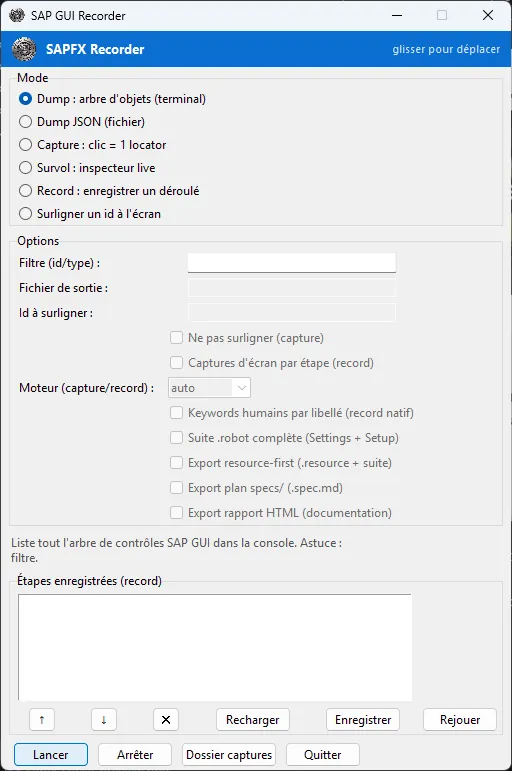
Launcher of the SAPFX desktop recorder for SAP GUI
SAP GUI recorder launcher: capture, hover and record modes, exports of your choice.Windows workstation
Record, then replay
> python tools/recorder/sapgui_recorder.py --record --engine native --semantic --export-resources
# other exports: --export-spec  --export-istqb  --export-report
> python tools/recorder/sapgui_recorder.py --replay process.robot
# recorder.cmd opens the graphical launcher

What it does

  • Records through the API events (native engine) or by reading the screen, by choice or automatically
  • Adds assertions while recording: Ctrl+Alt+A for the value of the active field, Ctrl+Alt+V for the visual fingerprint of the screen
  • Replays a recording against the open SAP GUI session and stops at the first failing step
  • Converts a VBS script from the recorder built into SAP GUI (Alt+F12), without an SAP session
  • Graphical launcher: mode, exports, a step panel to reorder, edit or delete

What you get

  • A complete, replayable .robot suite
  • A « resource and suite » pair: business keywords on one side, a test without raw ids on the other
  • A plan in the specs/ format, the entry point of the agents
  • An ISTQB test plan and test cases, with a replay block
  • An HTML documentation report, screenshots included

Its limits

  • SAP GUI for Windows only
  • A recording is a draft: review it before turning it into a test
  • Reading the screen follows a human pace; a process played by a script is recorded with the native engine
Browser extension02 / 10

Web recorder: the locator the library will resolve, not a generated id

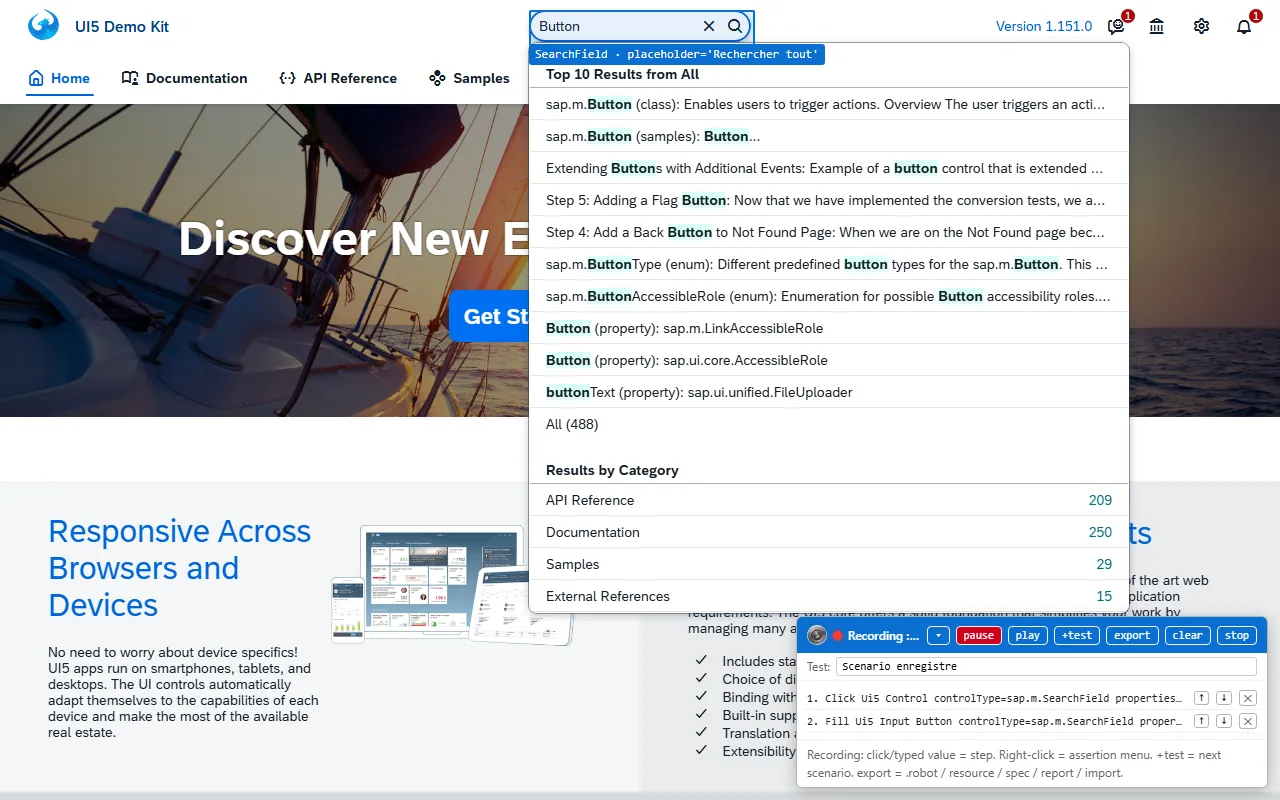
A Chrome extension (Manifest V3) records your gestures in SAP Fiori and SAPUI5 applications, SAP GUI for HTML and hybrid pages. Each click becomes a SapFioriLibrary keyword, with the locator the library resolves at run time: the type and properties of the UI5 control, never the DOM id that changes from one load to the next.

The panel replays the recording in the page before any export, which validates it without running robot. In the « resource and suite » pair, UI5 steps become self-healing: the XPath captured at recording time serves as a fallback.

Proof: validated against an SAP Fiori Elements application (cap-sflight, SAPUI5 1.139): the exported suite and the « resource and suite » pair replayed green by Robot Framework, the effect measured in the application (4,133 travels filtered down to 91). The exports are guarded by an offline suite.

OpenUI5 Demo KitReal screenshot
SAPFX web recorder recording on the OpenUI5 Demo Kit
Web recorder on the public OpenUI5 Demo Kit (SAPUI5 1.151): the search field is designated by its UI5 control type, each gesture becomes a line.OpenUI5 Demo KitScreen of an SAPUI5 application: the SAP logo and SAP trademarks are the property of SAP SE.
Install the extension
# chrome://extensions, developer mode on
# « Load unpacked »: tools/recorder_web/extension
# then Alt+Shift+R on the tab of the SAP application

What it does

  • Five locator engines: UI5 control by type and properties, XPath over UI5 controls, WebGUI SID, UI5 Web Components, generic DOM by role and accessible name
  • Records clicks, input, the Enter key and navigation, waiting for the UI5 page to settle
  • Right click: assertion menu (visible, text)
  • play replays in the page, +test adds a scenario, an exported .robot can be imported back
  • Alt+Shift+R shortcut to start and stop

What you get

  • A complete .robot suite, browser opening included
  • A « resource and suite » pair with self-healing keywords
  • A plan in the specs/ format
  • An ISTQB test plan and test cases
  • An HTML documentation report

Its limits

  • Extension loaded from the pack, not published on the Chrome Web Store
  • Cross-origin iframes: one panel per reachable frame, no overall view
  • A draft, to review before turning it into a test
Request scoring03 / 10

Prompt Eval: score a test request before the agents work on it

A request handed to the agents (a scenario sheet written in plain language) is a prompt, and working it end to end, from the plan to the reviews, costs in the order of two million agent tokens on our campaigns. Prompt Eval scores it before that spend, on three levels: its form, checked without any model call against the workbench writing rule; its template share, measured over the whole batch, because a line copied as is by other requests says nothing about this one; and eight criteria judged by a language model in one call per request (intent, facts versus assumptions, level of evidence, a deciding assertion, target, repeatability, capabilities, posture), each scored from 1 to 5 with a reason that quotes the request.

The judge fails closed: an unreachable model, an unreadable answer or a missing criterion score zero with a reason, never a pass. The configured judge runs locally, served by LM Studio on the workstation that also serves the CabrIA QA memory; any OpenAI-compatible endpoint can replace it. Finally, a feasibility probe checks over RFC, read-only and without a single agent token, that the transactions, tables and function modules the request names exist on each target system, proven by its release.

Proof: first pass on October 10, 2026 over the 160 requests of the workbench: 150 outside the reference form, 88% template lines in the October 4 batch; the probe returned 25 playable requests, 71 blocked and 64 to be qualified on ABAP Platform 1909.

Score, judge, probe
> python -m tools.prompt_eval check
# form and template share, no model call; exit code 1 if a request fails
> python -m tools.prompt_eval score --only 21,100 --samples 3
# eight criteria judged, median of three judgements
> python -m tools.prompt_eval feasibility --cibles a4h
# named SAP objects, probed over RFC read-only
> python -m tools.prompt_eval gui --open

What it does

  • Form and template share checked without any model call, with an exit code usable in continuous integration
  • Eight criteria scored from 1 to 5 by a judge, median of several judgements on demand, reasons that quote the request
  • Read-only RFC feasibility probe: playable, blocked (the missing object is named) or to be qualified
  • Versioned runs, comparison of two runs with a significance test and HTML reports, through our prompt evaluation engine PEW (Prompt Eval Workflow)
  • Local interface: score, criteria, reasons and feasibility request by request, scoring launched in the background

What you get

  • One score per request, with the findings and reasons that explain it
  • The list of requests that cannot run on a target, before an agent is launched there
  • The measure of what a rewrite of the requests changed, run against run

Its limits

  • The score measures how a request is written, not its cost: the initial study on thirteen processed requests shows no significant relation
  • "Playable" means the named objects exist, not that authorisations, data or the business flow are there: exploring the system is still needed
  • The eight criteria need a judge; form, template share and feasibility do without one
  • New, not yet in the Windows deployment pack
AI agents04 / 10

Five agents that plan, write, repair and review your tests, under human control

The agents work in Claude Code or GitHub Copilot and drive SAP through the MCP bridge described below. They apply the Spec-Test-Driven Development method: a request written in human language is confronted with the real system before any test is written, each step runs on SAP before it is written, and the suite carries the fingerprint of the plan it derives from.

A shared contract sets what an agent may touch: repair is limited to the business keyword layer, never the test or its assertions, within a bounded budget (2 candidates, 20 calls, 15 minutes) and with a named verdict.

Request in human languagesap-planner: observed plansap-generator: suite run before it is writtensap-verifier: reviewsap-istqb: design review

Proof: six campaigns planned, generated and reviewed by these agents from September 24 to October 1, 2026, on ABAP Platform 1909 and 2023: RAP travel 7/7, Business Partner role 7/7, My Inbox sentinel 7/7, launchpad tile 6/6, IDoc 12/12, background job and spool 11/11.

tests/robot/cross/idoc_sortant_ale_a4h.robot
*** Settings ***
# …
...                 Spec: specs/idoc-sortant-ale-a4h.md (sha256:f5ddc14105b7, 2026-10-01)
...                 Generated from specs/idoc-sortant-ale-a4h.md by sap-generator:
...                 re-run the generator rather than hand-editing locators here.
# …
1. Un IDoc sortant émis atteint le statut 03, jugé par son code, et son entrant n'est pas oublié
    # …
    ${email}=    New Run Email
    ${cree}=    Send Flight Customer Change Idoc    ${TEST_CUSTOMER}    ${email}
    # …
    Dispatch Idoc By Number    ${docnum}
    ${sortant}=    Wait For Idoc Status    ${docnum}    expected=success    timeout=${IDOC_WAIT}
    Should Be Equal    ${sortant}[status]    ${STATUS_OUTBOUND_PASSED_TO_PORT}
    # …
    ${lien}=    Get Idoc Counterpart    ${docnum}    timeout=${COUNTERPART_WAIT}
    Track Run Idoc    ${lien}[counterpart]
    ${entrant}=    Wait For Idoc Status    ${lien}[counterpart]    expected=${STATUS_INBOUND_POSTED}
    ...    timeout=${IDOC_WAIT}
    Should Be Equal    ${entrant}[status]    ${STATUS_INBOUND_POSTED}
    Flight Customer Email Should Be    ${TEST_CUSTOMER}    ${email}

What it does

  • sap-planner explores the system and writes an observed plan in specs/
  • sap-generator runs each step before writing it and seals the suite with the SHA-256 fingerprint of the plan
  • sap-healer reproduces a failure and repairs the resources layer, never the test
  • sap-verifier reviews read-only against the business invariant and the evidence
  • sap-istqb writes ISTQB test plans and cases and reviews the design of each suite

What you get

  • Ready commands: /sap-plan, /sap-generate, /sap-heal, /sap-verify, /sap-istqb, /sap-maintain
  • Plans reviewed by a human before any generation
  • A log of every repair and a review report with a verdict
  • The definitions for VS Code and GitHub Copilot, generated from the same source

Its limits

  • An AI assistant is required (Claude Code or GitHub Copilot), with your subscription and your data policy
  • Important actions (commit, push, deletion, installation, publication) always ask for approval, even in autonomous mode
  • They speed things up, they do not decide: plans and reviews are read
Contract and continuity05 / 10

A framework that bounds the agents and lets them resume after an interruption

An agent does not act alone on an SAP system. The plan produces a mission file that records the authorised target and the business invariant; a script validates it, along with the fingerprints of the evidence, and an independent review reads the result. A permission hook lets reads through and asks for approval for the rest; autonomous mode is switched on only by a human, on their workstation, and important actions still ask for approval there.

An interrupted mission (server restart, timeout, crash) can be resumed: findings, decisions and the next step are written as they happen, one entry per file, never rewritten. Resuming means reopening the sessions, proving the target and perceiving again: the trail replays nothing and grants no permission.

Proof: the mission file validation runs in continuous integration and in a unit test; the day it first ran, three mission files out of six were invalid, for three different reasons, and were fixed.

Contract, policy and resumption
> python scripts/agent_contract.py handoff --all
# each mission file: target, invariant, evidence fingerprints
> python scripts/agent_policy.py status
# permission policy of the workstation (only a human changes it)
> python scripts/agent_handover.py resume my-mission
# validates the trail and returns what an agent needs to resume

What it does

  • Mission file validated by script: target, invariant, fingerprints of the evidence
  • Named verdicts of the healer: repaired and verified, application defect, blocked, human needed, not verified
  • Permission hook for Claude Code and GitHub Copilot; autonomous policy changed by a human only
  • Immutable handover trail and journal of business writes, which never replays anything
  • sapfx skill: the four channels, the perception then action loop, the conventions and the agent cycle, in one call

What you get

  • Traceable missions: which target, which invariant, which verdict
  • Resumption without loss after an interruption, by another agent
  • A skill shipped in the pack, usable without access to the repository

Its limits

  • The framework bounds the agents, it does not guarantee they succeed: « I did not succeed » is a planned outcome
  • The hook acts in the hosts that load it: check that it is loaded before relying on it
  • No secret in the trail: credentials are given again when resuming
MCP plugins06 / 10

The MCP bridge: an AI assistant that sees the SAP screen before it acts

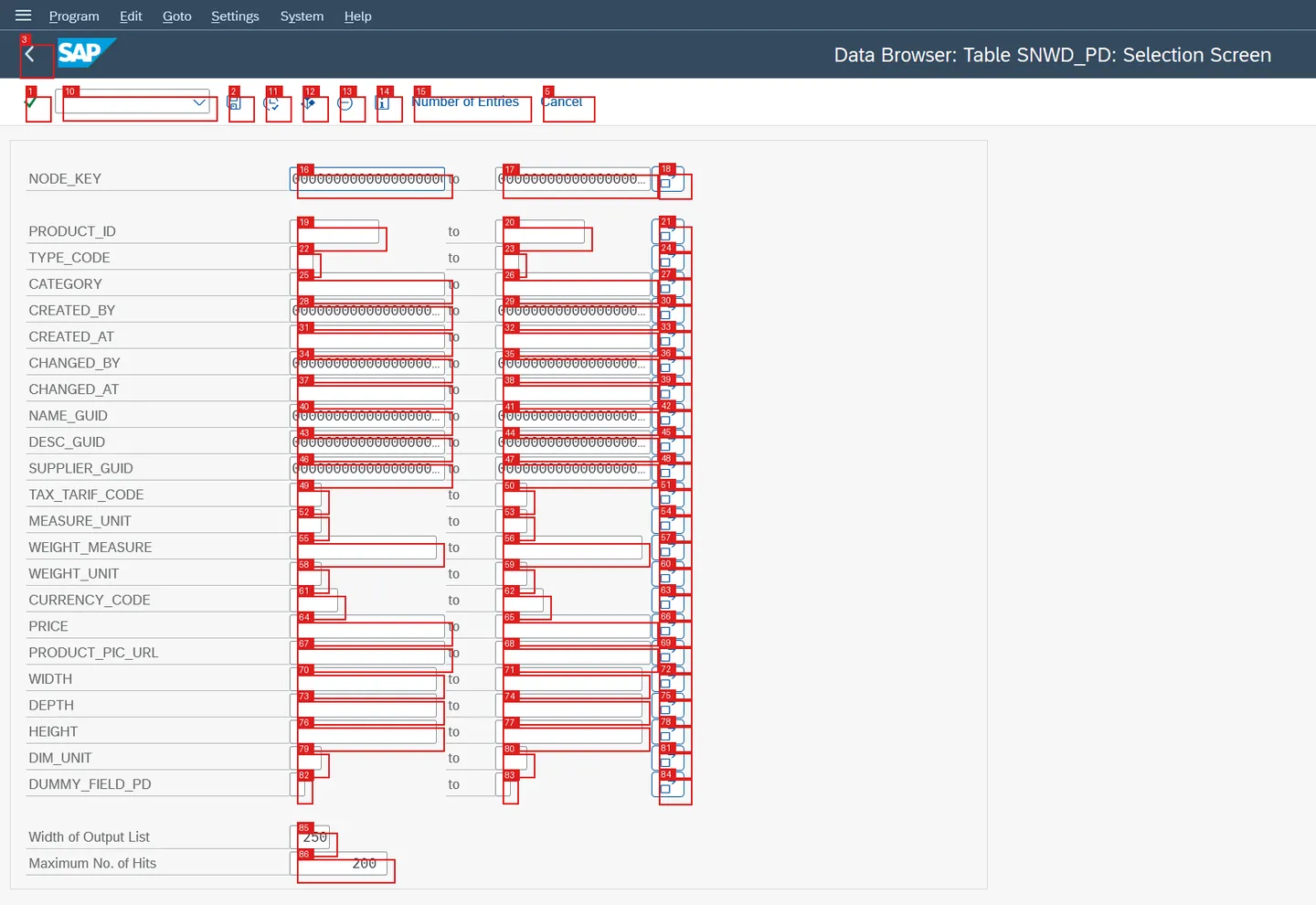
rf-mcp is an open-source MCP server that runs Robot Framework keywords step by step for an AI assistant; it does not know SAP. The three SAPFX plugins give it perception: the SAP GUI screen as a text signature, the UI5 control tree of an SAP Fiori page, the state of the API channel, and a screen already seen returned as a diff rather than in full.

The sapfx-mcp overlay starts rf-mcp unchanged and adds four tools the plugin contract does not allow: the SAP state read live, the real screenshot (raw or annotated with numbered targets), reloading the plugins without a restart and, since October 9, 2026, approval by a human of a write to SAP: the agent cannot approve itself.

Proof: end-to-end runs through rf-mcp 0.36, replayed on September 28, 2026: SAP Fiori 8/8 on a test page, SAP GUI 9/9 against ABAP Platform 1909, state served by the plugins included; human approval through rf-mcp, 30/30 on ABAP Platform 2023 and on 1909, on October 9, 2026.

A4H, release 754Real screenshot
SAP GUI: SE16 selection screen of SNWD_PD, each field boxed and numbered
Annotated screenshot of the SE16 selection screen: 86 numbered targets, the view an agent receives in annotated mode, produced by the library keyword Get Annotated Screenshot.A4H, release 754 · Captured on October 5, 2026Screen of SAP software: the SAP logo and SAP trademarks are the property of SAP SE.
MCP server declared by the installer
> sapfx-mcp --transport stdio --without-frontend
# rf-mcp unchanged, plus four tools:
#   sapfx_state          SAP state read live, as a diff
#   sapfx_screenshot     raw or annotated screenshot (numbered targets)
#   sapfx_reload         plugin reload without a restart
#   sapfx_approve_write  a human approves the next write

What it does

  • Routing of keywords to the right library and locator guidance specific to SAP
  • sapfx_state: transaction, window stack, open modal, type of the status message
  • sapfx_screenshot: image of the screen, with numbered targets the agent designates by number
  • sapfx_reload: hot reload of the plugin layer
  • sapfx_approve_write: the write request (reason, target, system, client, screen) is shown to a human, who approves or refuses; no answer is a refusal. When the MCP client cannot display the request, an input box opens on the workstation
  • Warning when the SAPFX code changed since the server started

What you get

  • An MCP server declared for Claude Code (.mcp.json) and for VS Code (.vscode/mcp.json), written by the installer
  • An API channel state without any login credential
  • An approval bound to a target and recorded in the audit trail, with its approver

Its limits

  • One live SAP GUI session per server process
  • rf-mcp versions validated from 0.31 to 0.36: a version not validated is refused at startup
  • Human approval relies on the session policy of the libraries
  • The bridge serves the agent; it does not replace human review
Preventive maintenance07 / 10

Know that a screen changed before the campaign turns red

The libraries heal a lost locator and say so: a warning in the Robot Framework log and, if enabled, a line in a telemetry log. The workbench puts these traces to work: a script reads the telemetry of several runs, spots locators always healed to the same target and proposes the fix in the resources layer, which it applies only on request.

A sentinel suite, to schedule, compares the initial screen of a list of transactions with its reference (structure, visual fingerprint, screen areas) and produces a drift report; /sap-maintain chains sentinel, telemetry and the sap-healer agent into a single report.

Proof: reference, unchanged screen and detected drift cycle validated live against ABAP Platform 1909; the drift script and both guards ship in the pack, in Python with no dependency.

tests/robot/ecc_drift_sentinel.robot
*** Variables ***
# Les écrans surveillés : l'écran initial de chaque transaction critique.
@{WATCHED_TRANSACTIONS}    SE16    SE38    SM50
# …
*** Test Cases ***
Watch Critical Screens
    # …
    ${outcomes}=    Create List
    FOR    ${tcode}    IN    @{WATCHED_TRANSACTIONS}
        Go To Transaction    ${tcode}
        Wait Until Busy Done
        ${verdict}=    Check Screen Against Watch    ${tcode}
        ...    directory=${WATCH_DIR}    fail_on_drift=${FAIL_ON_DRIFT}
        ...    per_resolution=${PER_RESOLUTION}
        Append To List    ${outcomes}    ${verdict}
    END
Drift report and plan guard
> python scripts/healing_drift_report.py --log healing.jsonl
# proposes the fixes to the resources layer; --apply applies them
> python scripts/check_spec_sync.py
# is each suite still in step with its plan?

What it does

  • Drift report from SAPFX_HEALING_LOG: stable drifts located in the .resource files, unstable drifts left to a human
  • Fix applied only with --apply, and listed
  • Sentinel: watching one more screen means adding a transaction to a list
  • Guards: a suite still in step with its plan, a generated suite without raw locators or fixed waits

What you get

  • Readable Markdown reports
  • Exit codes a scheduled job can use (1 = drift to handle)
  • Screen references to version with your tests

Its limits

  • Never modifies a test, only the resources layer
  • The sentinel sees a change, it does not say whether it was intended
  • Visual references depend on the screen resolution: one per geometry
Interface landscape map08 / 10

Landscape map: what is connected to your SAP, from the group down to the table

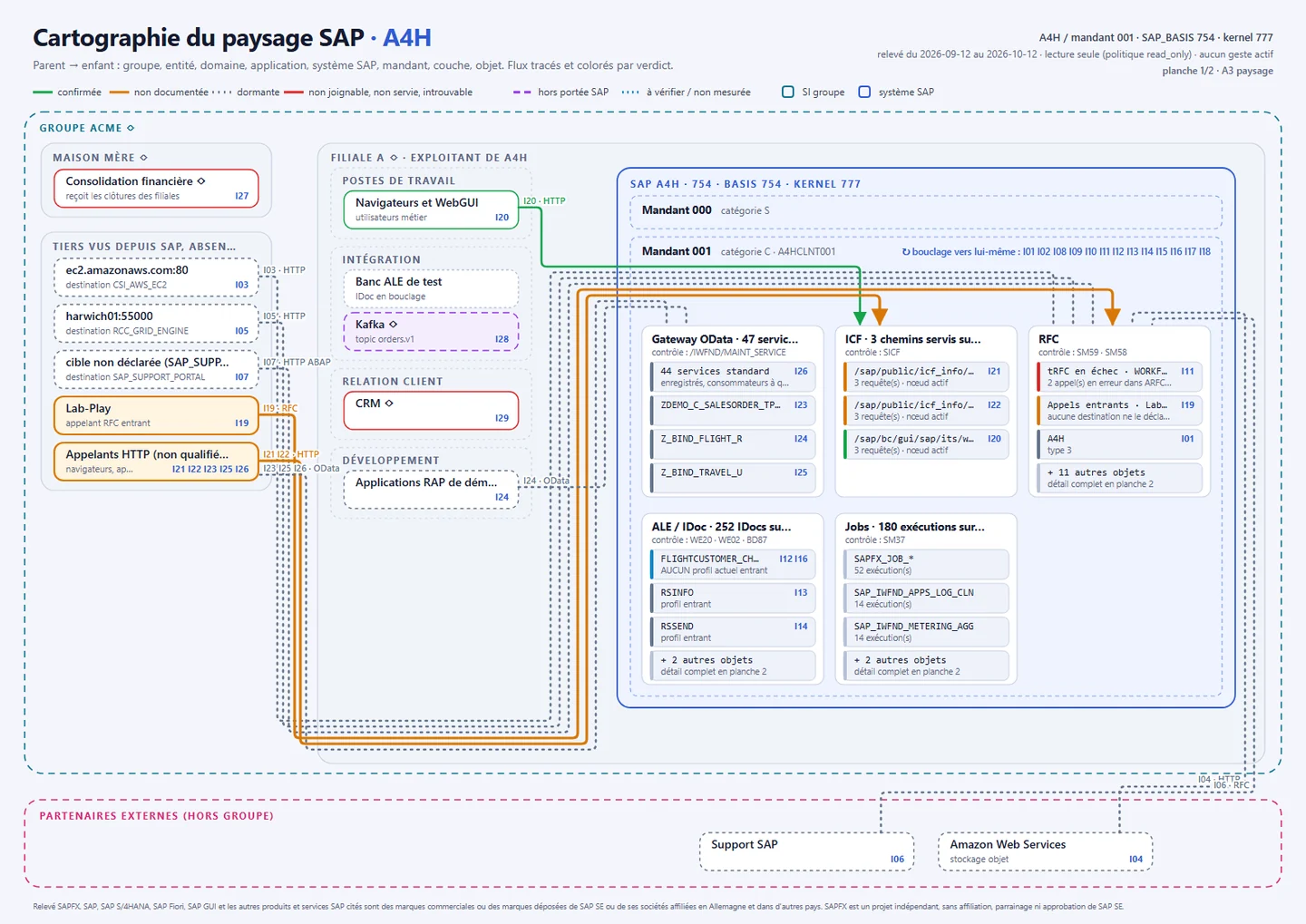
An interface map goes stale the day it is drawn. This tool rebuilds it from the system itself: an RFC survey, read only and proven by the release, reads destinations, IDoc profiles and traffic, Gateway services, served HTTP paths, jobs, failed tRFC calls and call workload. It then reconciles that survey, by a rule and on stable keys, with your application map and your interface register: group, entities, domains, applications, then SAP system, client, interface layer, object, down to the function, program, transaction and table.

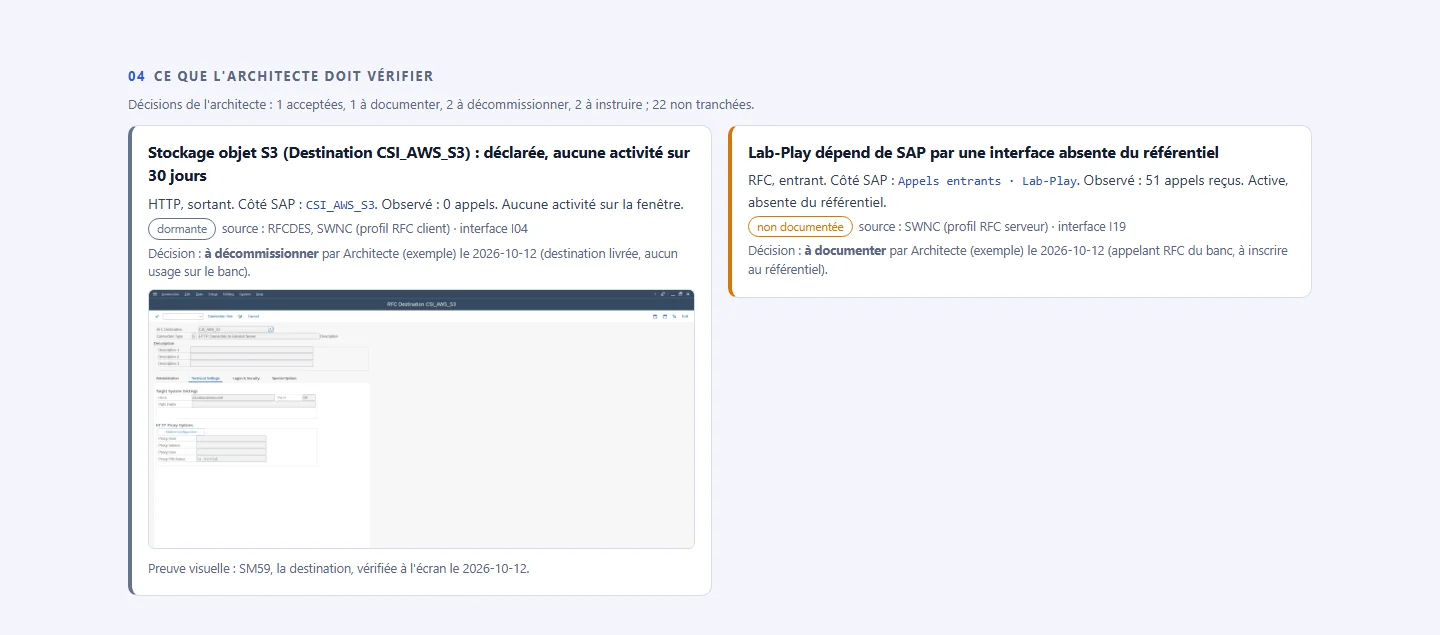
The tool decides nothing: each interface gets a verdict computed by a rule, never by a language model (confirmed, undocumented, dormant, not found, out of SAP's reach, not measured, never zero), and whatever needs a human look comes with its sources. Visual proofs are captured in SAP GUI under a read-only policy (SM59, WE20, SICF, /IWFND/MAINT_SERVICE), each checked against the interface it illustrates. The architect's decisions (accept, document, retire, investigate) carry over from one survey to the next while the verdict holds.

Proof: surveys of October 12, 2026 on ABAP Platform 1909 and 2023 (validation suite 5/5 on each, read only); visual proofs 19/19 checked on 1909 and 16/16 on 2023; on 1909, 28 interfaces to decide, and the decisions carried over as they were to the next survey.

A4H, release 754Real screenshot
A3 landscape plate of the A4H SAP system, flows coloured by verdict
Landscape plate on A4H (ABAP Platform 1909), rendered in French: interfaces surveyed by RFC, flows routed and coloured by verdict. Levels marked ◇ (group, entities, applications) come from an example application map.A4H, release 754 · Survey of October 12, 2026
A4H, release 754Real screenshot
Extract of the landscape report: findings to check, architect decision and SM59 proof
What the architect has to check: a dormant destination, its decision and its SM59 proof, and an RFC caller missing from the register.A4H, release 754 · Survey of October 12, 2026Screen of SAP software: the SAP logo and SAP trademarks are the property of SAP SE.
Survey, qualify, prove, render
> python -m tools.landscape_map collect --ashost <host> --user <user> --password-env SAP_PWD --expect-release 754 -o entree.json
# RFC survey, read-only policy set first
> python -m tools.landscape_map merge entree.json --apps applications.csv --register register.csv -o qualified.json
> python -m tools.landscape_map build qualified.json -o survey.json
> python -m tools.landscape_map proofs survey.json -o out --conn /H/<host>/S/3200 --user <user> --password-env SAP_PWD --expect-release 754
> python -m tools.landscape_map render survey.json -o out --decisions decisions.json --proofs out/preuves.json --pdf

What it does

  • Read-only RFC survey, target proven by its release before anything is read
  • Rule-based reconciliation with the application map and the interface register (CSV or JSON)
  • One verdict per interface, computed by a rule and never by a model; unreadable activity is "not measured", never zero
  • Proofs captured in SAP GUI read only and checked on screen, SAP logo masked
  • Architect decisions bound to the interface key, carried over to the next survey, named when the verdict changes
  • Comparison of two surveys, with an exit code when something moved

What you get

  • Two A3 plates: the nested landscape, flows routed and coloured by verdict, and the parent-child tree
  • An HTML report and its PDF: key figures, one lineage card per interface, findings to check with their proofs
  • The architect's work list, a Mermaid export draw.io can read, and a deterministic artifact

Its limits

  • Activity depends on the system's workload collection: without it, it is "not measured"
  • File and event-bus exchanges are out of SAP's sight; SOAP interfaces are not surveyed yet
  • Group, entities and domains come from your sources: without them they stay placeholders, never guessed
  • Not yet in the Windows deployment pack
Example business layer09 / 10

Business keywords and example suites, to adapt to your screens

Between the libraries and your tests sits a layer of keywords that speaks business: open a session, count the entries of a table, read records. The workbench provides one, measured on the lab systems, with names that echo each other from one channel to the next.

It is the layer the sap-healer agent repairs, and the one you adapt: each file opens with the « EXEMPLE À PERSONNALISER » (example to customise) banner, because a release, a language or a screen variant changes its values.

Proof: the example suites come from the lab campaigns, for instance the EPM product read through three channels, 7/7 on releases 754 and 758; in continuous integration, the installed pack passes a dry run that resolves every keyword.

Names that echo each other from one channel to the next (example layer)
ActionSAP GUIWebGUI and SAP FioriODataRFC
OpenOpen SAP And Log InOpen SAP And Log InOpen Api ChannelOpen Rfc Channel
CountCount Table EntriesCount WebGui Table EntriesCount Business EntitiesCount Business Records
CloseClose SAPClose SAPClose Api ChannelClose Rfc Channel

What it does

  • Nine vocabulary files: SAP GUI, SAP Fiori and WebGUI, OData, RFC, security (by RFC and on screen), cross-channel checks, table output, demo data
  • Twenty-five page objects, one per screen or application: SE16, SE11, launchpad, Business Partner, IDoc, background job and spool...
  • Twelve example suites in the pack, including one that reads the same product through three channels and one that runs on the public OpenUI5 Demo Kit, without credentials

What you get

  • Tests that read in business terms, without SAP ids in the suite
  • A single place to repair a changed screen
  • Your own keywords in your own file (site_keywords.resource), next to the shipped files

Its limits

  • Examples, not a universal vocabulary: every value was measured on our development systems
  • To check and adapt on your system: release, language, screen variants, custom fields
  • Starting points, not a coverage of your processes
Deployment pack10 / 10

A test workstation ready with one command, without cloning a repository

The pack is a self-contained ZIP for Windows: the libraries and MCP plugins as packages, both recorders, the business layer, the twelve example suites, the agents and their skill, the maintenance scripts. Its installer creates a local Python environment, installs pinned versions and checks the integrity of every file before going further.

The optional RFC channel has its own script: it relies on the NW RFC runtime that SAP GUI 8.00 already places on the workstation, or on the SAP SDK you provide, and checks that the import really works.

Proof: in continuous integration, the real ZIP is installed by its real installer on Python 3.10, then passes a dry run; the 0.8.5 pack was built and tested on a fresh extraction on October 13, 2026.

Install the pack
> install.cmd -WithMcp -WithBrowsers
# local environment, pinned versions, integrity checked
> powershell -ExecutionPolicy Bypass -File install-rfc.ps1 -UseSapGuiRuntime
# optional RFC channel, no SDK archive on a workstation with SAP GUI 8.00

What it does

  • install.cmd: local .venv environment, pinned dependencies, import check
  • -WithMcp: rf-mcp, plugins and MCP configurations written in place
  • -WithBrowsers: Playwright Chromium for SAP Fiori and the WebGUI
  • Refuses an altered file (SHA256SUMS.txt) and a Python older than 3.10
  • install-rfc.ps1 -CheckOnly: diagnosis of the RFC channel without changing anything

What you get

  • A workstation that runs the example suites
  • MCP configurations for Claude Code and VS Code
  • A SHA-256 inventory of every file in the pack

Its limits

  • Windows only, like SAP GUI for Windows
  • The SAP NW RFC SDK is under SAP licence and not redistributable: it is not in the pack
  • The RFC channel requires Python 3.10 to 3.12 (available pyrfc versions)
Included, free

Already in the libraries: the functions the tools rely on

Part of what makes the workbench useful lives in the PyPI package itself. These functions are free, documented and usable without any tool.

In the PyPI package

Preflights

Find out before failing late: server scripting, list rendering on the workstation, security posture of the SAP GUI client, Gateway activity. Each one names the setting to fix.

Scripting Should Be Fully EnabledGateway Should Be Active
In the PyPI package

Numbered perception

One line and one number per target on the screen; an agent designates a number, the keyword acts on the id, checked again before the action.

Get Screen MapGet Ui5 Page Map
In the PyPI package

Logged healing

A lost locator is healed with a warning and, if enabled, a telemetry line: the raw material of the drift report.

Resolve Element With HealingResolve Ui5 With Fallback
In the PyPI package

Screen watch

A screen compared with its reference: structure, renamed ids paired, visual fingerprint and screen areas. The core of the sentinel suite.

Check Screen Against Watch
In the PyPI package

Visual assertions

Perceptual fingerprints of a screen, an element or a web page, volatile areas masked: what the scripting API cannot see.

Screen Should Match BaselineUi5 Screen Should Match Baseline
In the PyPI package

Output in five formats

A table read on any of the four channels is written as SVG, XLSX, CSV, JSON Lines or Parquet, then read back; a truncated extract is refused.

Table Extract Should Be Complete
In the PyPI package

Deterministic artifact

Sorted JSON, SHA-256 fingerprint over a declared scope and recomputed on reading: an artifact edited afterwards is refused.

Write Deterministic ArtifactCompare Deterministic Artifacts
In the PyPI package

Proof of closure

At the end of a campaign, prove that the SAP GUI sessions are closed, without a screenshot and without counting the other sessions of the workstation.

Sap Gui Should Have No Open Connection
CabrIA programme (R&D)

Two CabrIA bricks, on top of the workbench

They come from the CabrIA programme, not from SAPFX. Optional, they plug in and out without touching the tests, and the deployment pack does not ship them.

Optional · CabrIA

Flight recorder

A listener on each Robot Framework run, a plugin on top of the MCP server and a collector of the healing log record what each run leaves behind, with secrets and personal data masked before any storage. The files go to a neighbouring folder, outside the test repository.

It is removed by unsetting two environment variables.

Optional · CabrIA

Cited QA memory

The local qa-brain MCP server makes what the field has taught (keywords, plans, documentation, lessons written after incidents) searchable in natural language, with its sources: 4,119 passages indexed on October 9, 2026. The SAPFX agents consult it before their judgement calls when it is mounted.

Observation on the real system always decides: a cited passage is never proof. When absent, it blocks nothing.

Rigour

A workbench that applies its own rules

Mechanical guards, in continuous integration, hold what the workbench promises instead of relying on discipline.

One version everywhere

At each release, libraries, plugins, agents, extension and skill carry the same version, checked by a test: 0.8.5 today.

Checked conventions

No raw locator in a generated suite, no fixed wait, a suite tied to the fingerprint of its plan: checked in continuous integration and at each edit.

A Python floor held

The suites and the business layer are checked for Python 3.10, the floor of the pack: a defect invisible under 3.12 made it necessary.

Allowlists

The public repository and the pack carry only what was decided: a new folder stays private until someone chooses to publish it.

No promises

What the tools do not do

Better to know before asking for them.

They do not replace a graphical editor

A recording is a draft, and a test remains a Robot Framework file made of keywords that read without programming: someone on the team reviews and maintains it.

They do not decide for you

An agent plan is reviewed before generation, important actions ask for approval, and repair never touches an assertion.

They create no lock-in

The files produced run with robot and the libraries; stopping the tools breaks no test.

They claim no figure of gain

No productivity gain has been measured. What is measured are campaigns played on our SAP development systems, never on a customer system.

They do not run everywhere

The pack and the SAP GUI recorder are for Windows, the agents require Claude Code or GitHub Copilot, the RFC channel requires Python 3.10 to 3.12.

They are not published

Not in the PyPI package, not in the public repository, not on the Chrome Web Store: they are delivered on quote.

Get the tools

Three steps, starting with the free part

The tools only work with the libraries: start with them.

1

Install the libraries

pip install robotframework-sapfx, then a first test with the quickstart guide. You see what SAPFX does on your screens before asking for anything.

2

Describe your context

SAP channels, releases, test workstation, AI assistant in use, security constraints: through the form or by email. We tell you which tools will serve you, and which will not.

3

Receive your quote, then the workbench

The useful tools, their installation, training and the adaptation of the business layer to your screens are covered by a quote, within a scope defined together; the Windows deployment pack is then delivered to you.

The libraries remain open source and free, with or without the tools.

Frequently asked questions

The SAPFX workbench tools: the questions we get

The short answers; the rest is discussed on your case.

How do I record a SAP GUI test for Robot Framework?

With the SAP GUI recorder of the SAPFX workbench: you walk through the process in SAP GUI for Windows, it turns it into SapEccLibrary keywords from the events of the SAP GUI Scripting API and exports a replayable .robot suite, a resource and suite pair, a plan, ISTQB test cases and an HTML report. The recording remains a draft to review.

Can an AI agent generate SAP tests?

Yes, with the SAPFX workbench agents in Claude Code or GitHub Copilot: sap-planner confronts the request with the SAP system and writes an observed plan, sap-generator runs each step on SAP before writing it, sap-verifier and sap-istqb review the suite. A human reviews the plan before generation.

Are the SAPFX tools included in the PyPI package?

No. The robotframework-sapfx package contains the three libraries and their shared core, under the Apache 2.0 licence. The workbench tools (recorders, request scoring, AI agents, MCP plugins, maintenance, example business layer, Windows pack) are neither in the package nor in the public repository: they are delivered on quote.

Do I need the tools to use SAPFX?

No. The libraries are enough to write, run and maintain SAP tests in Robot Framework. The tools shorten writing, generating and maintaining tests; they are not a prerequisite.

Do the tests produced by the tools depend on the tools?

No. They are .robot and .resource files that call the library keywords and run with robot. They belong to you and keep running without the tools.

Which AI assistant do the SAPFX agents need?

Claude Code, or GitHub Copilot in VS Code, with the rf-mcp MCP server and the SAPFX plugins. The recorders, the maintenance tools and the pack work without an AI assistant.

Do the tools send data outside the workstation?

The recorders, the maintenance tools and the pack run on the workstation and send nothing elsewhere; a password typed during a recording is replaced by a placeholder. Prompt Eval sends the request to the judge you configure, by default a locally served model. The agents go through the AI assistant you choose: what they perceive of the SAP screen is sent to that service, under your contract with it.

How do I know a test request is ready for the agents?

With Prompt Eval, the scoring tool of the SAPFX workbench: it checks the form of the request and its template share without any model call, has eight criteria judged by a language model, preferably local, and probes over RFC, read-only, that the SAP objects it names exist on the target. The score measures how the request is written, not its cost; "playable" does not replace exploring the system.

Can you map the interfaces of an SAP system?

Yes, with the landscape map tool of the SAPFX workbench: a read-only RFC survey reads destinations, IDoc profiles and traffic, Gateway services and served HTTP paths, reconciles them by a rule with your application map and your interface register, and renders two A3 plates and a report. Each interface gets a verdict computed by a rule, never by a language model, and the gaps to check come with their proofs captured in SAP GUI.

How do I get the SAPFX workbench tools?

On quote, through the contact form or by email: the quote covers the useful tools, their installation, training and adaptation to your screens, then the Windows deployment pack is delivered to you.

SAPFX workbench

The workbench tools for your team?

Tell us your SAP channels, your releases and your AI assistant: we point out the useful tools and send you a quote for their setup.

  • A technical exchange, not a sales pitch
  • Your data stays in France
SAPFX page

or straight by email: